How to Send WhatsApp Messages Without Saving Contacts
Four ways to message a WhatsApp number without adding it to your phone — the free wa.me link method, the official API, bulk tools, and what to avoid — plus which one fits which situation.
Quick answer
Yes. The free official way is WhatsApp's Click to Chat link: open https://wa.me/ followed by the number in international format with no plus sign or spaces, and a chat opens without saving the contact. For a whole list, a QR-paired bulk tool sends to every number in a spreadsheet directly — nothing is written to your phone's address book.
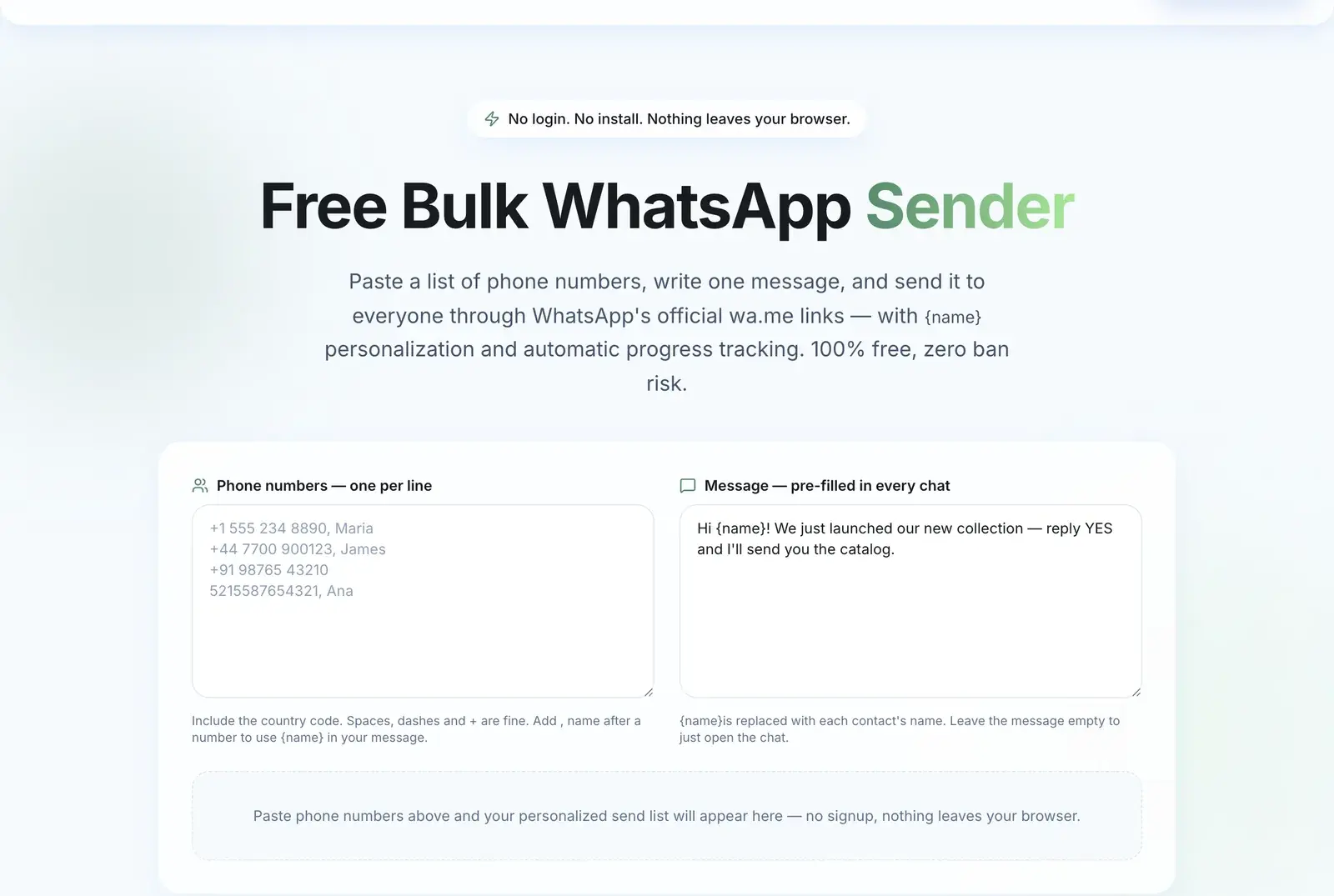
Short answer: yes, and the free way is WhatsApp's own Click to Chat link. Open https://wa.me/ followed by the number in international format with no plus sign or spaces — for example https://wa.me/447700900123 — and a chat opens without the number ever touching your address book.
That handles one message. If you need to reach two hundred people, you need a different approach. Here are all four options and where each one breaks down.
Why This Question Comes Up
Two reasons, and they need different answers.
"I need to message one person once." A lead filled in a form, a customer needs a delivery update, a supplier sent a quote. Saving them permanently pollutes your contacts for no reason.
"I need to message a list." You have 500 customer numbers in a spreadsheet. Saving 500 contacts to a phone is miserable, slow, and it syncs the whole lot to your personal Google or iCloud account.
The first is solved by a free link. The second is not.
Method 1: The wa.me Link (Free, Official, One at a Time)
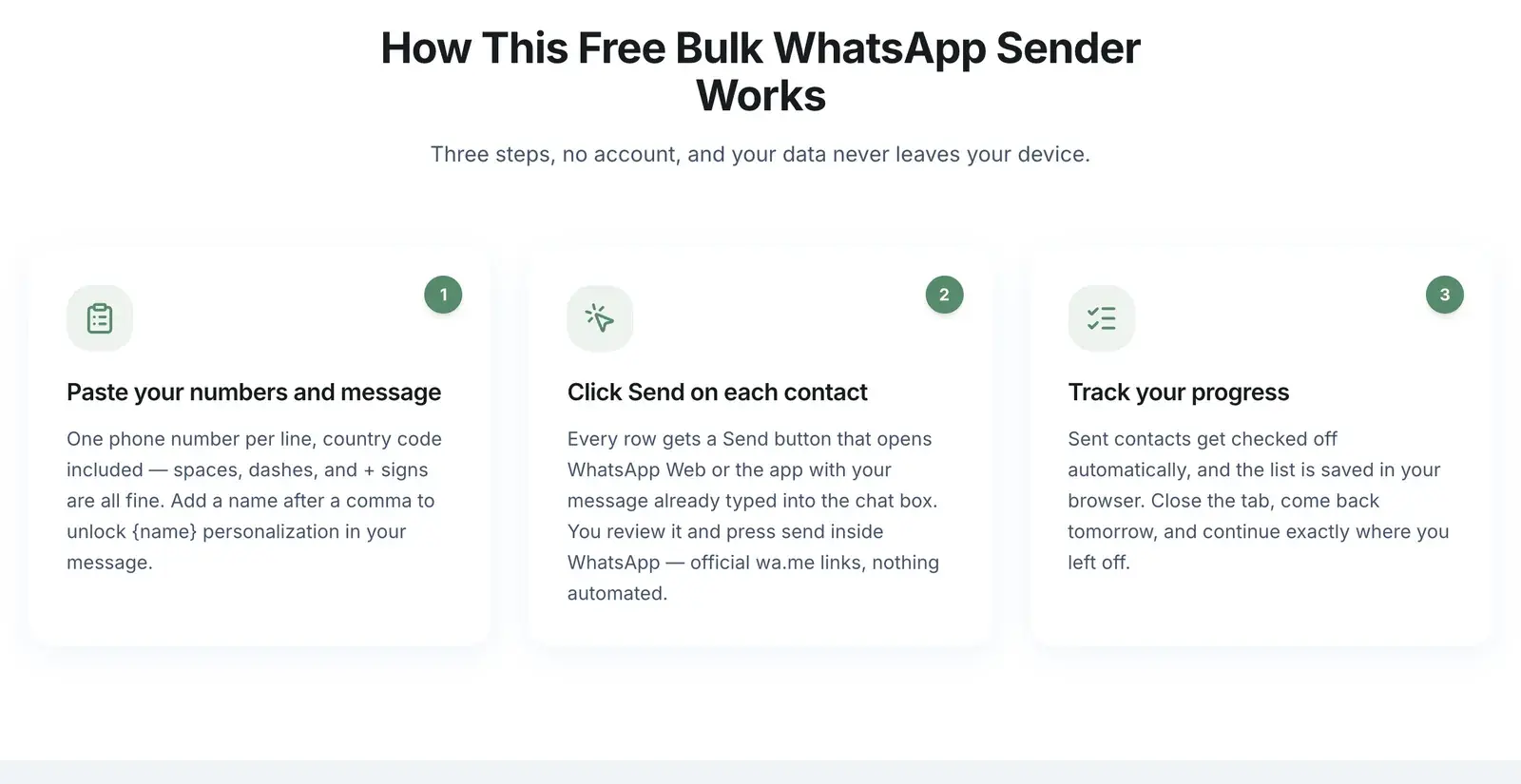
WhatsApp's Click to Chat feature is built into the product. No app, no tool, no cost.
The format:
- https://wa.me/447700900123 — opens a chat
- https://wa.me/447700900123?text=Hi%20there — opens a chat with text pre-filled
Rules that trip people up:
- Use the full international number including country code.
- No plus sign, no spaces, no dashes, no brackets. +44 7700 900123 becomes 447700900123.
- Drop any leading zero from the local number. UK 07700 900123 is 447700900123, not 4407700900123.
- Pre-filled text must be URL-encoded — spaces become %20.
Where it shines:
- A "Chat with us on WhatsApp" button on your website
- A QR code on a menu, flyer, receipt, or shop window
- Replying to a single inbound lead
- Your email signature
Where it stops: the message is not sent automatically. The link opens the chat with text ready; a human still presses send. For 200 recipients that is 200 link-opens and 200 taps, and you cannot personalize beyond what you typed into each URL.
Method 2: Type the Number Into WhatsApp Directly
Recent WhatsApp versions let you start a chat with an unsaved number from inside the app.
On Android: open WhatsApp, tap the new-chat button, and look for the option to enter a phone number directly. On iPhone: the same flow exists in the new-chat screen on current versions, though the exact placement moves between releases.
Same strengths and limits as the link method — fine for one conversation, useless for a list.
Method 3: The Official WhatsApp Business API
The API never touches a phone address book. You send to a list of numbers programmatically, through a Business Solution Provider.
Good: officially sanctioned, no ban risk when you follow policy, scales to very large volumes, unlocks the verified badge.
Costs: a platform subscription plus Meta's per-conversation fees, a dedicated number that is not registered to a normal WhatsApp app, business verification, and message templates that need approval before you can send promotional content. Setup is measured in days to weeks.
Right choice for enterprises and for anyone who cannot tolerate risk to their number. Heavy for a small business that wants to message its own customer list this afternoon.
Method 4: A QR-Paired Bulk Tool
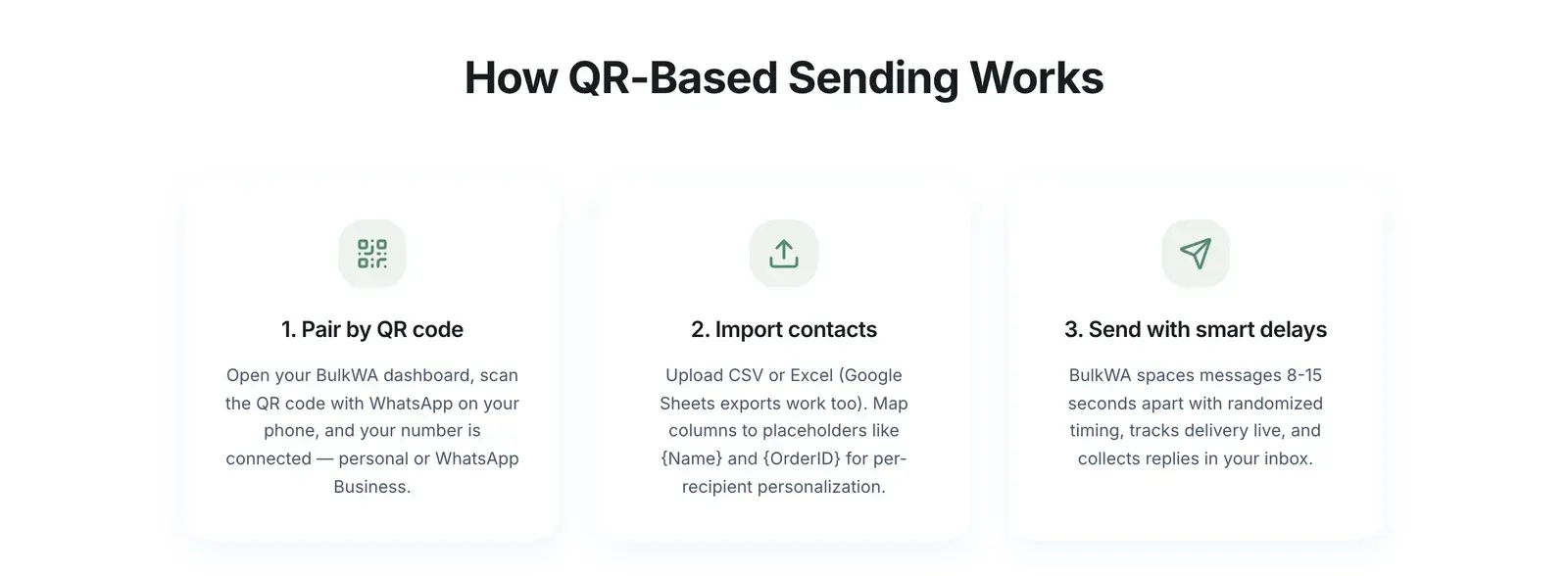
Tools like BulkWA pair with the WhatsApp account you already own by scanning a QR code — the same mechanism as WhatsApp Web. You upload a CSV of numbers and it sends to each one directly. Nothing is written to your phone's contacts.
How it works in practice:
- Scan the QR code once from the dashboard.
- Upload a CSV or Excel file of numbers, or pick contacts you already have.
- Write one message with placeholders like {Name} so each person gets a personalized version.
- Send now or schedule it.
Good: no per-message fees, no business verification, no template approval, works with your existing number, and personalization happens automatically per recipient.
The honest trade-off: this is outside the official API, which means it is outside WhatsApp's authorised automation, and ban risk is real and sits on your number. BulkWA reduces the known signals — randomized 8-15 second delays, per-recipient personalization, opt-in number warm-up, automatic STOP handling — but no tool removes the underlying risk. If that is unacceptable for your situation, use the API.
What To Avoid
Scripts that drive WhatsApp Web with browser automation. There are popular open-source projects that puppet a browser to fire messages. They typically send identical messages with no delay from a fresh session — the exact behavioural fingerprint that gets numbers banned fastest. They are free, and they are the most expensive option if your number matters.
Any tool asking you to enter your WhatsApp password or verification code. WhatsApp has no password, and your 6-digit SMS code is the key to your account. Legitimate tools use QR pairing, which you can revoke at any time from Linked Devices on your phone. Anyone asking for a code is trying to steal the account.
Buying number lists. Beyond the legal problems, these produce blocks and reports at a rate that ends numbers quickly.
Choosing Between Them
| Situation | Use |
|---|---|
| One message, one person | wa.me link |
| Website or printed "message us" button | wa.me link or QR code |
| A handful of people, occasionally | wa.me links, one at a time |
| A customer list, regularly, small business | QR-paired bulk tool |
| High volume, enterprise, zero risk tolerance | Official Business API |
| Restricted product category | Official API, and check the Commerce Policy first |
The Part That Actually Determines Your Outcome
Whether a number is saved in your phone has almost nothing to do with whether you get banned. What matters is whether the person on the other end wanted your message.
Someone who gave you their number and expects to hear from you will read it and often reply, whether or not you saved them. Someone who never asked will block or report you, and that is the signal WhatsApp acts on.
So: use whichever method fits your volume. Spend the saved effort on making sure the list is people who opted in. That is the variable that decides whether this works for years or ends in an appeal form.
Our Recommendation
For one person or a handful, use the wa.me link — it is free, official and carries no risk, and BulkWA's free link tool builds them for you from a pasted list. The moment you are clicking send more than thirty times, move to BulkWA proper: upload the same list as a CSV, map the columns, and the campaign sends to every number without any of them being saved to your phone. The free plan covers 50 messages a day so the switch costs nothing to try. Either way, what decides the outcome is not whether the numbers were saved — it is whether the people wanted the message.
Frequently Asked Questions
Can I send a WhatsApp message without saving the number?+
Yes. The simplest free method is WhatsApp's official Click to Chat link: open https://wa.me/ followed by the number in international format with no plus sign, spaces, or dashes — for example https://wa.me/447700900123. This opens a chat with that number without adding it to your phone's contacts, and it is an official WhatsApp feature rather than a workaround.
How do I send bulk WhatsApp messages without saving contacts?+
Tools that connect to your WhatsApp account, either through the official Business API or by QR pairing like BulkWA, send to a list of numbers directly without writing anything to your phone's address book. You upload a CSV of numbers, and the tool sends to each one. Manually clicking a wa.me link per recipient works but does not scale beyond a handful of people.
Does the wa.me link work for bulk messaging?+
No, not practically. A wa.me link opens one chat at a time and you still have to press send yourself, so 200 recipients means 200 manual link-opens and 200 send taps. It is excellent for a single outreach, for a 'message us' button on your website, or for a QR code on printed material — but it is a one-to-one tool, not a bulk one.
Is it against WhatsApp rules to message people who are not in my contacts?+
Messaging someone who is not saved in your phone is not itself a violation — the Click to Chat feature is official and built for exactly that. What matters is whether that person consented to hear from you. Messaging strangers at scale generates blocks and reports, and that is what triggers bans, regardless of whether their number was saved.
Ready to Try BulkWA?
Send bulk WhatsApp messages with personalized templates. Free to start, no credit card required.
Get Started Free