No API approval · no per-message fees
Message your whole customer list on WhatsApp, from your own number
Upload a spreadsheet, write one message with {Name}, and BulkWA sends it one by one with human-like pauses: personalised, tracked, and paused automatically if anything looks off.
- No credit card
- Random 8–20 s gaps
- STOP replies auto opt-out
- Cancel anytime
- –MayaLondonQueued
- –OmarLeedsQueued
- –DanaBostonQueued
- –BenMiamiQueued
- –PriyaLeedsQueued
- –LiorTel AvivQueued
- –SamLondonQueued
- –ChloeBostonQueued
- –NoahBristolQueued
- –AnaMiamiQueued
- –TomLondonQueued
- –ZoeBristolQueued
Replies 0
Replies show up here as they come in.
STOP list 1
Sam replied STOP. He's opted out, and every future campaign will skip him automatically.
Gaps between sends: 14 s · 12 s · 18 s · 11 s · 15 s · 18 s · 13 s · 16 s · 12 s
BulkWA doesn't speed up when you do. Real campaigns keep the 8–20 s gaps.
Your first campaign in about 3 minutes
No Meta approval, no developer, no new number. These are the actual three screens.
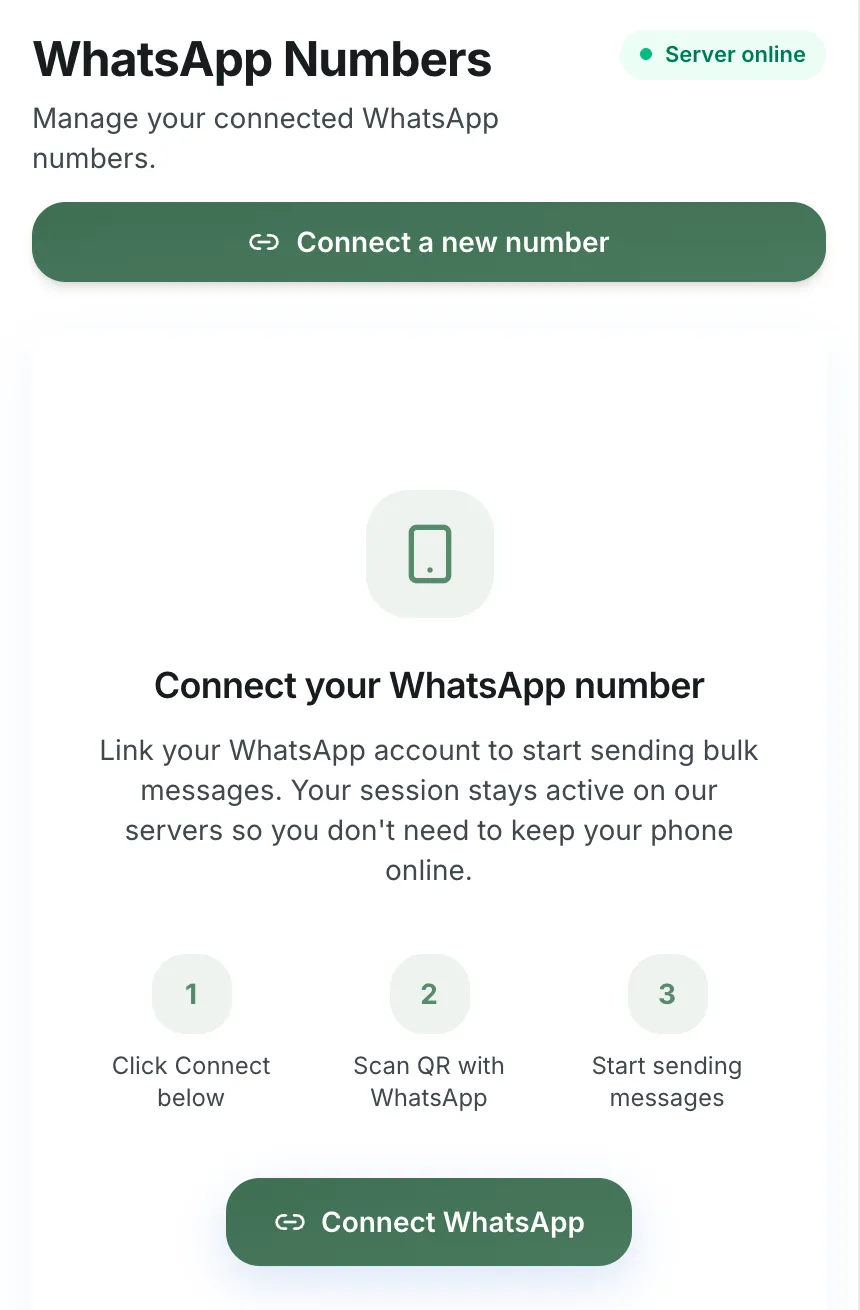
- Step 1about 30 s
Link your WhatsApp
Open WhatsApp, then Linked devices, then scan the QR. Same as WhatsApp Web; your number stays yours.
- Step 2about 1 min
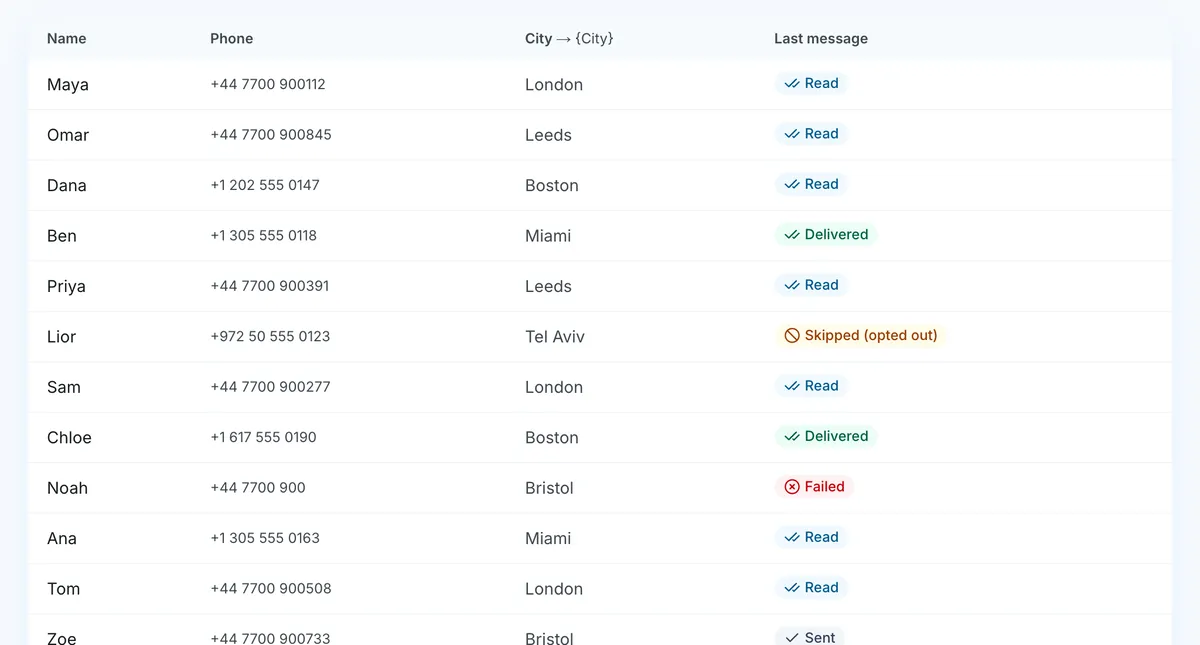
Upload your list
Drop a CSV or Excel file (a Google Sheets export works). Extra columns, like City, become placeholders.
- Step 3about 1 min
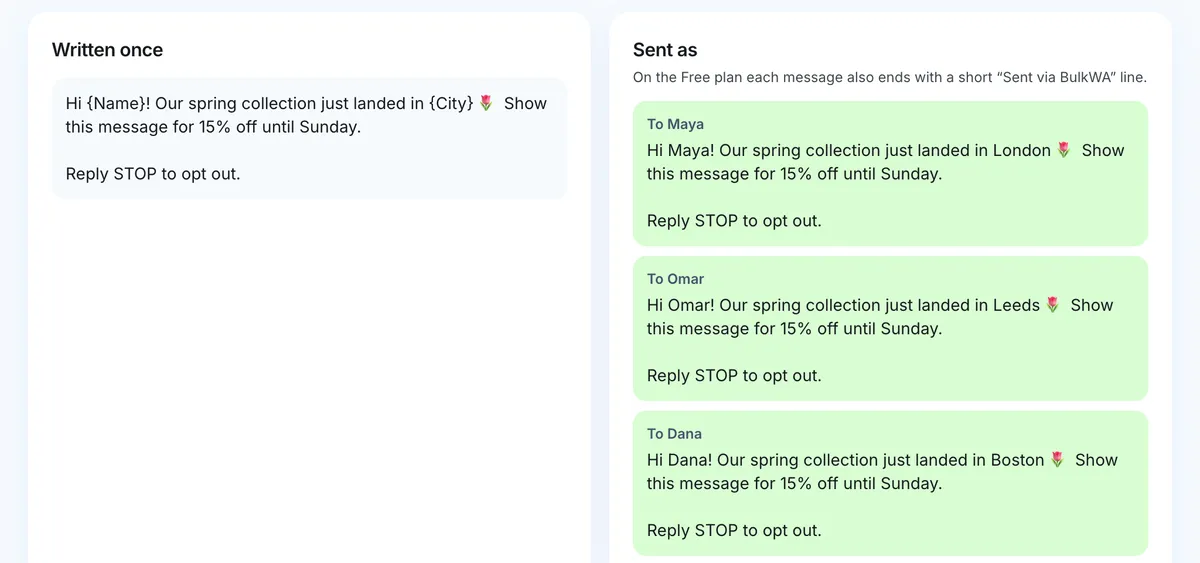
Write once, send to everyone
One message with placeholders. BulkWA sends one at a time with random gaps and shows live status.
120 messages × about 14 s average gap ≈ 28 min, running in the background.
Businesses whose customers already answer on WhatsApp
Messages to people who know you: customers, patients, parents, members. Here's what a campaign typically says in each. All use cases
Three jobs, one tool
Announce, follow up, reply: from the WhatsApp number your customers already know.
Announce
Send an offer to your whole list
- One message, personalised with {Name}, {City} or any column
- Goes out one at a time, a random 8–20 s apart
- Images, video and PDFs on Starter and up
Follow up
Remind people without remembering to
- Schedule a campaign for later (Starter and up)
- Repeat it daily, weekly or monthly (Pro)
- Auto follow-up only to people who didn't reply (Pro)
Reply
Answer everyone from one inbox
- Replies from every campaign in one place (Starter and up)
- Keyword auto-replies for common questions (Pro)
- STOP / BAJA / PARE opt-outs handled on every plan
Also included: delivery and read tracking on every campaign, and 2+ numbers on one dashboard with Business.
Ban safety
Paced like a person, not a blaster
WhatsApp bans numbers that behave like spam. BulkWA's defaults are built around that. These are the real limits in the product, not marketing copy.
Random 8–20 second gaps
Messages go out one at a time with a different pause each time, never in a burst. You can lengthen the gaps; the builder warns you if you go below the safe range.
Warm-up for new numbers
A number under two months old starts at 40 messages a day and ramps 10% a day to 150, with a 15-second minimum gap while warming.
STOP means stop
If someone replies STOP, UNSUBSCRIBE, CANCEL, END or QUIT (even while your number is offline), they're opted out automatically and skipped by every future campaign.
Dead numbers skipped
Each number is checked before sending; numbers that aren't on WhatsApp are marked failed instead of being messaged blindly.
Pauses, never piles up
If your phone unlinks or you hit a daily cap, the campaign pauses with the rest still queued, and resumes when you reconnect.
Warm-up daily cap for a new number
Messages per day, day 0 → day 14 (then 150/day).
Honest note: no tool can promise a number won't be banned. Messaging people who never gave you their number is the fastest way to get reported, and pacing can't fix that.
The 7 rules we followWhatsApp vs SMS vs email, side by side
How each one is priced, approved and answered. No borrowed open-rate stats, just how the channels work.
One flat monthly price, no per-message fees
Start free with 50 messages a day. Upgrade only when you need more volume, media or scheduling.
Try it without risking anything
We're a young product and we'd rather earn your trust than rent it. Here's what you actually get.
Start free, stay free if you want
The free plan includes 50 messages every day with no time limit and no credit card. Test your first real campaign before paying a cent.
Safety features on by default
Every campaign ships with random 8–20 second gaps, per-recipient personalization, and live delivery monitoring. The settings that protect your number are the defaults, not upsells.
Flat pricing, cancel anytime
One monthly price, zero per-message fees, no contracts. Cancel in two clicks and keep access until the end of your billing period.
Before you sign up
What BulkWA can't do
Better you hear it here than find out after a campaign.
It isn't the official WhatsApp Business API
No green tick, no Meta-approved templates. It sends from your own number the way WhatsApp Web does.
QR sender vs the API →It can't make cold outreach safe
Messaging bought or scraped lists gets numbers reported and banned, whatever the pacing.
Who it's safe to message →The free plan is text-only
Free campaigns add a short “Sent via BulkWA” line and can't attach media or be scheduled. Starter ($9/mo) removes all three.
Compare plans →It's WhatsApp only
No SMS or email fallback. If a contact isn't on WhatsApp, the message is marked failed, not re-routed.
What it's great at
- Use the number your customers already have saved
- Personalise every message from your spreadsheet columns
- See sent, delivered and read per contact
- Reply to answers from one inbox (Starter and up)
Need the official API instead? See how we compare to Wati.
Questions people ask before signing up
Everything you need to know about BulkWA.
How do I connect my WhatsApp account?
Simply scan a QR code displayed on your BulkWA dashboard using the WhatsApp app on your phone. It works with both personal and WhatsApp Business accounts. The process takes about 10 seconds.
Is there a risk of my WhatsApp account getting banned?
WhatsApp may restrict accounts that send unsolicited bulk messages. BulkWA includes built-in anti-ban protections like configurable delays between messages (a random 8–20 seconds by default) and multi-number support. However, the risk is on your WhatsApp number. We recommend only messaging contacts who have opted in.
What are the message limits?
Free: 50 messages per day (resets every day). Starter ($9): 1,000 messages/month. Pro ($29.99): 5,000 messages/month. Business ($99): 10,000 messages/month. Paid-plan counters reset on your billing cycle date.
How does billing work?
We use Stripe for secure payment processing. You can subscribe monthly or annually (save up to 22% with annual billing). Upgrade, downgrade, or cancel at any time. Cancellations take effect at the end of your current billing period.
Can I use my personal WhatsApp number?
Yes. BulkWA works with both personal WhatsApp accounts and WhatsApp Business accounts. You connect by scanning a QR code, just like WhatsApp Web.
What file formats do you support for contacts?
We support CSV files and Excel spreadsheets (.xlsx). If your contacts live in Google Sheets, just download the sheet as CSV or Excel and upload it. You can map any column in your spreadsheet to message placeholders like {Name}, {Company}, or any custom field.
Can I schedule messages for later?
Yes. Scheduling a campaign for a specific date and time is on Starter and up; recurring campaigns (daily, weekly or monthly) are on Pro and Business.
Do you offer refunds?
We offer a free plan so you can try BulkWA before committing. Paid subscriptions can be cancelled at any time and remain active until the end of the billing period. We do not offer prorated refunds.
Answers to the questions that come up first
Short, honest guides, grouped by where you are.
Getting started
Staying safe
Free WhatsApp tools, no signup
- Link & QR code generatorA wa.me link, printable QR code and website chat button for your number.
- Message templatesCopy-ready promotions, reminders and follow-ups for 10 industries.
- Free bulk senderPaste numbers, send one personalised message each through wa.me links.
- Number list cleanerInternational format, duplicates removed, Excel-broken numbers caught.
- Ban risk checkerScore a planned send by volume, number age, pacing and audience.
- API cost calculatorMeta's official per-message rates for 47 markets vs a flat monthly plan.
Shipped recently
Send your first campaign today
Start with 50 free messages every day. No credit card required. Upgrade anytime as you grow.
Each person gets their own name.99/300
How it would arrive
- To MayaHi Maya! Our spring collection just landed in London. Show this message for 15% off until Sunday.
- To OmarHi Omar! Our spring collection just landed in Leeds. Show this message for 15% off until Sunday.
- To DanaHi Dana! Our spring collection just landed in Boston. Show this message for 15% off until Sunday.
50 free messages a dayNo credit card
Start free