WhatsApp Business vs API: Which One Do You Need?
A plain comparison of the three WhatsApp products — the regular app, the free Business app, and the Business API — covering cost, limits, team access, and which fits your size.
Quick answer
Use the regular WhatsApp app for personal chats, the free WhatsApp Business app if one person handles under about 20 conversations a day, and the WhatsApp Business API if you need multiple agents, CRM integration or high official volume. If you need to send campaigns to your own list but the API is too heavy, a QR-paired tool is the fourth option most small businesses actually choose.
Short answer: use the regular app for personal chats, the free Business app if one person handles under about 20 conversations a day, and the Business API if you need multiple agents, CRM integration, or high volume. If you need to send campaigns to your own customer list but the API is too heavy, a QR-paired tool is the fourth option most small businesses actually land on.
Here is what separates them, without the marketing gloss.
The Three Official Products
| WhatsApp Business app | WhatsApp Business API | ||
|---|---|---|---|
| Cost | Free | Free | Subscription + per-conversation fees |
| It is a... | Phone app | Phone app | Interface, no app |
| Devices / agents | 1 phone + linked devices | 1 phone + linked devices | Many agents, shared inbox |
| Business profile | No | Yes | Yes |
| Product catalogue | No | Yes | Yes |
| Automation | None | Away + greeting messages, quick replies | Full chatbots, conditional flows |
| CRM integration | No | No | Yes, bidirectional |
| Broadcast | 256 per list, saved contacts only | 256 per list, saved contacts only | Template messages at scale |
| Setup time | Minutes | Minutes | Days to weeks |
| Verified green badge | No | No | Possible |
| Message templates | N/A | N/A | Required, pre-approved |
WhatsApp (Regular)
The consumer app. Personal messaging, no business features. Plenty of small businesses run on it, and it works until the day you need a second person to answer, or you want anything that looks like a company rather than an individual.
Use it if: you are a sole trader with a handful of customer chats a week and no ambition to formalise.
WhatsApp Business App
Free, and genuinely useful. It is the regular app plus business tooling:
- A business profile — address, hours, website, description, category
- A product catalogue customers can browse in-chat
- Labels to organise chats (New Customer, Pending Payment, Paid)
- Quick replies — saved responses fired with a shortcut
- Automated greeting and away messages
- Basic message statistics
Where it stops, and this is the important part:
- It lives on one phone. Linked devices let you use it on a laptop, but there is no true multi-agent shared inbox with assignment and internal notes.
- It integrates with nothing. No CRM, no helpdesk, no order system. Customer history lives inside WhatsApp and nowhere else.
- Broadcasts are capped at 256 and require the recipient to have saved your number. This restriction quietly kills most marketing use — a large share of your audience receives nothing, and you get no error.
- No real automation. Away messages are not a chatbot.
- No personalization at scale, no scheduling, no delivery reporting.
Use it if: one person handles your messages, you are under roughly 20 conversations a day, and you mostly reply rather than initiate.
WhatsApp Business API (the Business Platform)
Not an app. It is an interface you connect to, almost always through a Business Solution Provider who supplies the dashboard, inbox, and analytics on top.
What it unlocks:
- Many agents at once in a shared inbox, with routing, assignment, and internal notes
- Real integration — REST API and webhooks, so conversations sync bidirectionally with your CRM, helpdesk, or order system
- Genuine automation — chatbots with conditional flows that can query your database and act on it
- High, published volume limits that scale from 250 conversations a day to unlimited
- Interactive message features — buttons, list menus, and templates
- The green verified badge, for businesses that qualify
What it costs you:
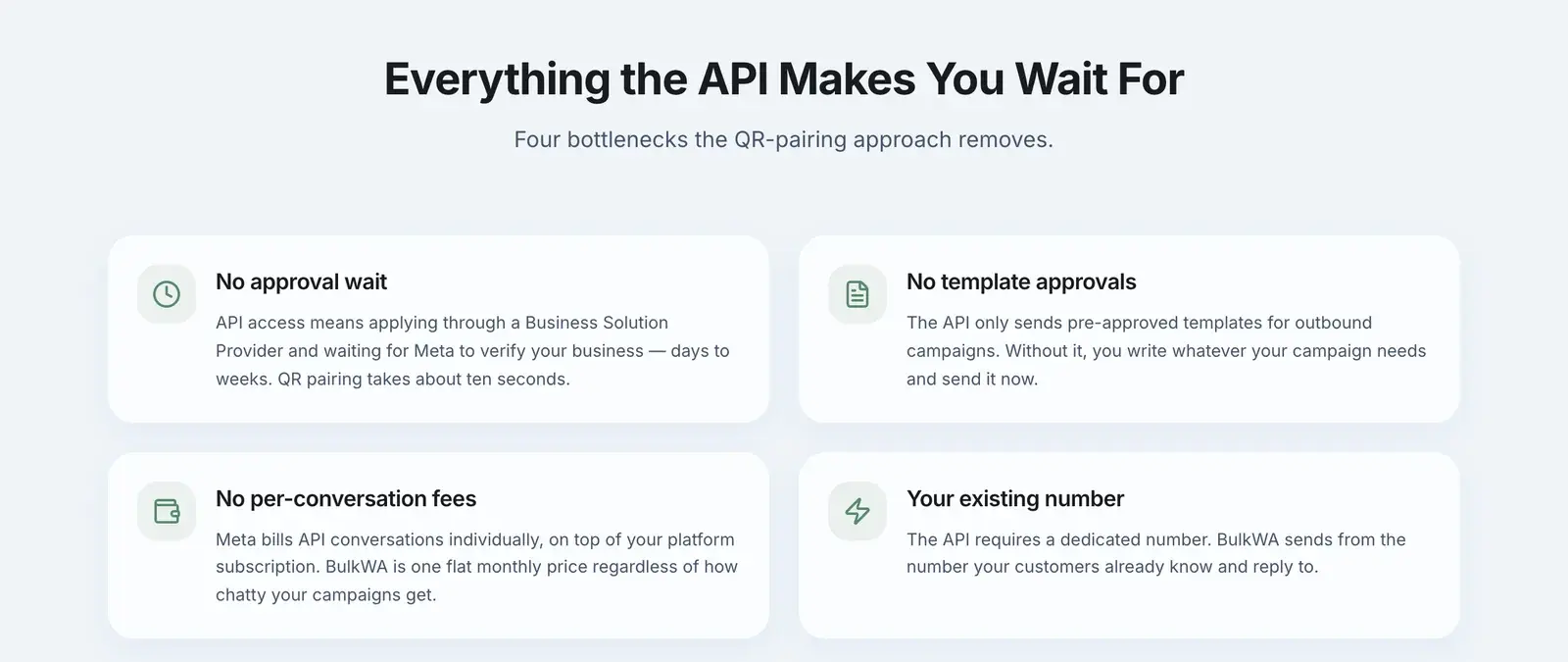
- Two bills. A platform subscription to your provider, plus Meta's fees. Meta charges per conversation, not per message, with rates varying by country and category — marketing conversations are consistently the most expensive.
- A dedicated phone number that is not registered to a normal WhatsApp app. You cannot use your existing WhatsApp number without migrating it, and migration is one-way.
- Business verification, which takes days.
- Template approval before you can send any business-initiated message. Each template is reviewed, typically within 24 to 48 hours.
Use it if: you have a team answering messages, you need WhatsApp inside your existing systems, you are in a regulated industry, or your volume genuinely justifies the overhead.
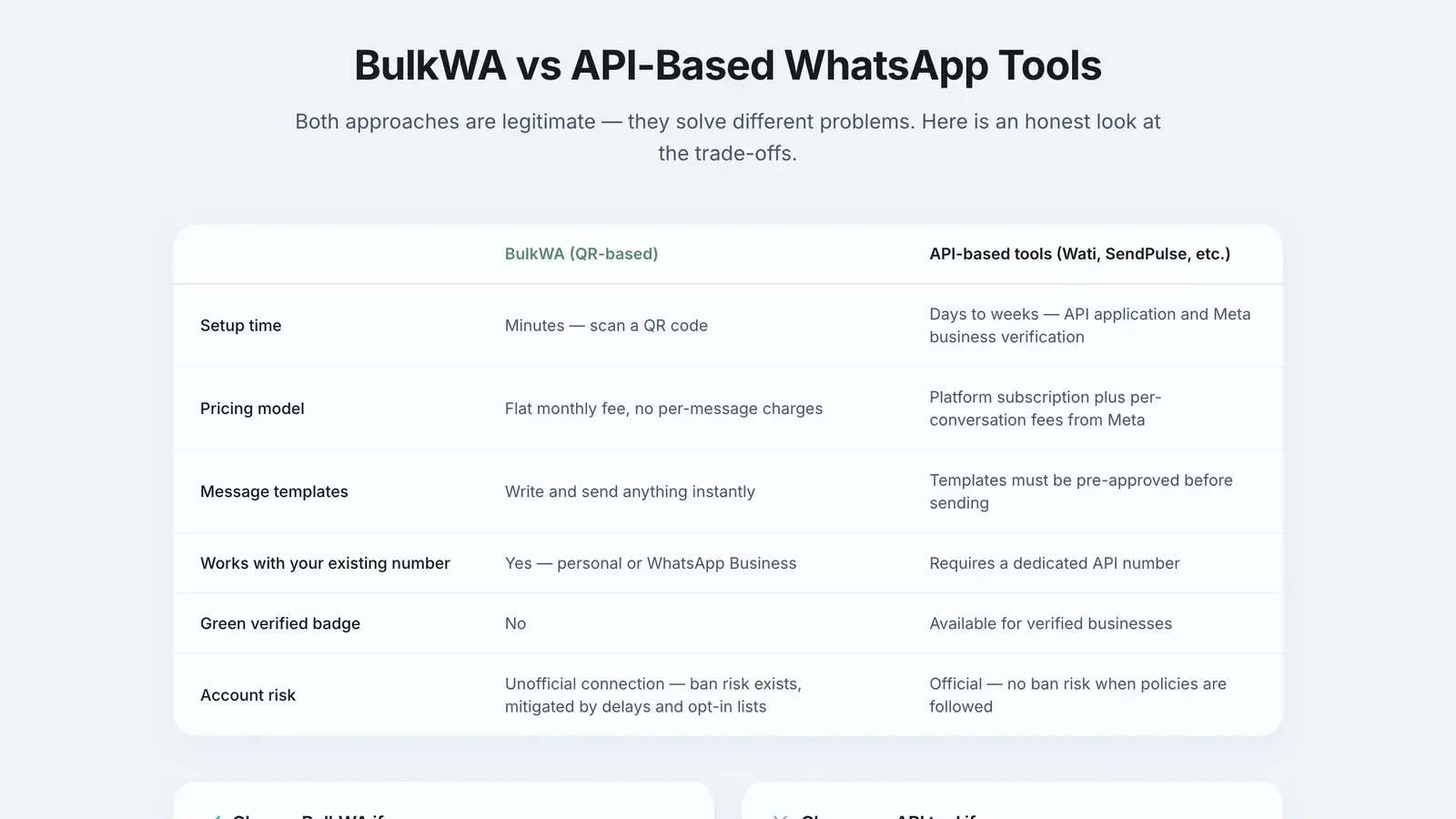
The Fourth Option Nobody Puts in the Comparison Table
There is a gap between "one phone, 256-contact broadcasts, no personalization" and "business verification, template approval, and two invoices". A very large number of small businesses live in that gap.
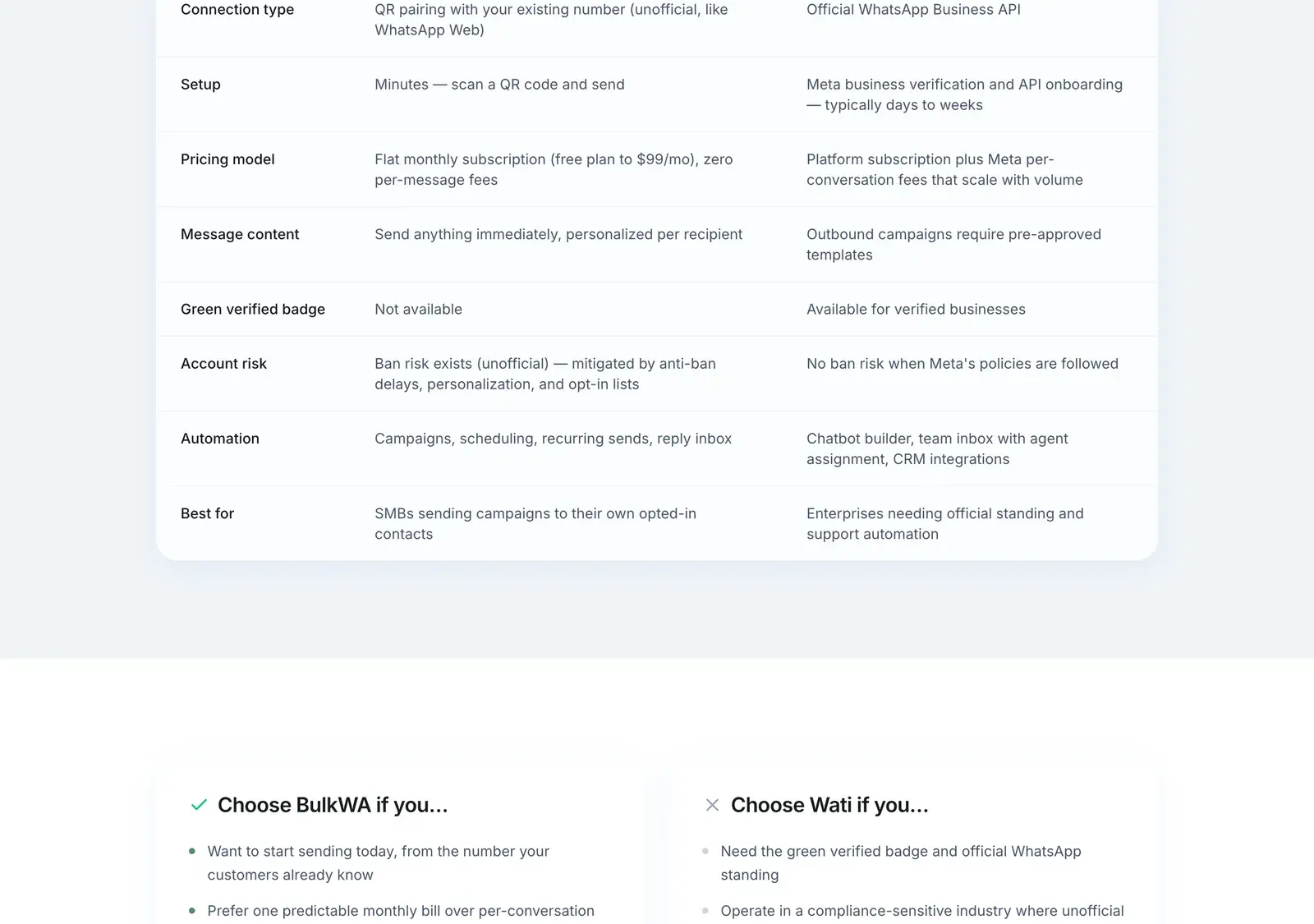
QR-paired tools like BulkWA sit there. They connect to the WhatsApp account you already own — same mechanism as WhatsApp Web — and add campaign sending, CSV import, per-recipient personalization, scheduling, delivery reporting, and a reply inbox on top.
What you get: no business verification, no template approval, no per-message fees, your existing number, and setup in minutes rather than weeks.
The trade-off, stated plainly: bulk sending outside the official API is against WhatsApp's Terms of Service. Ban risk is real and it sits on your number, not on the vendor. BulkWA reduces the known ban signals — randomized 8-15 second delays, personalization so no two messages are identical, opt-in number warm-up for fresh numbers, automatic STOP handling, and live delivery monitoring — but the underlying risk does not go to zero. Any vendor telling you otherwise is selling, not informing.
How to Actually Choose
Answer these in order:
1. Do you need more than one person answering messages simultaneously?
Yes, and it is core to your operation → API. No → keep reading.
2. Does WhatsApp need to talk to your CRM, helpdesk, or order system?
Yes → API. No → keep reading.
3. Can you tolerate any risk to this phone number?
No, because the line *is* the business — a clinic, a bank, a marketplace → API. Yes, or you can use a secondary number → keep reading.
4. Do you need to initiate campaigns to a list, or mostly reply to inbound?
Mostly reply → the free Business app is genuinely enough. Initiate campaigns → keep reading.
5. Is your product category restricted by Meta's Commerce Policy?
Alcohol, tobacco, weapons, adult content, gambling, certain healthcare → check the policy carefully; the API with proper approval is the only defensible route.
6. Otherwise: a QR-paired tool is the pragmatic fit, provided your list is opted in.
A Note on Migrating
If you eventually move to the API, understand that migrating a number from the Business app to the API is one-way. Once it is on the API you cannot use it in the app again. Many businesses keep their app number for personal-feeling conversations and use a separate number on the API for automated flows.
Our Recommendation
Be honest about which question you are answering. If it is "how do I run a support team on WhatsApp with my CRM", the API is the right tool and the cost is justified. If it is "how do I send a personalized campaign to the 800 customers in my spreadsheet this week", the API is a month of setup and two invoices for something BulkWA does from a browser in ten minutes with no per-message fees — on the understanding that it is unofficial and the risk sits on your number. Start on BulkWA's free plan if your need is the second one; you will know within a day whether it fits.
The Bottom Line
The free Business app is a better product than most people realise, and it is the right answer more often than vendors admit — until the moment you need a second agent or a personalized campaign.
The API is the officially correct answer for anything at scale, and its cost is real but usually justified once you are big enough to need it.
The middle ground exists because the gap between them is enormous, and most businesses are in it. Just go in knowing what you are trading.
Frequently Asked Questions
What is the difference between WhatsApp Business and the WhatsApp Business API?+
The WhatsApp Business app is a free mobile app for small teams: it adds a business profile, catalogue, labels, quick replies and away messages, but it runs on one phone and cannot connect to other software. The WhatsApp Business API has no app at all — it is an interface you connect to through a provider, supporting multiple simultaneous agents, CRM integration and chatbots, and it charges per conversation.
Is the WhatsApp Business app free?+
Yes, the WhatsApp Business app is completely free to download and use, with no subscription and no per-message charges. The WhatsApp Business API is not free: you pay a platform subscription to whichever provider you use, plus Meta's per-conversation fees, which vary by country and by whether the conversation is marketing, utility, authentication, or service.
Can I use the WhatsApp Business app for bulk messaging?+
Only in a very limited way. The Business app includes broadcast lists capped at 256 contacts, and recipients only receive a broadcast if they have saved your number in their phone — so much of your list silently receives nothing. There is no personalization, no scheduling, and no delivery reporting, which is why businesses with real lists move to either the API or a QR-paired bulk tool.
Do I need the WhatsApp Business API to send bulk messages?+
No. The API is the officially sanctioned route and the right choice for enterprises and regulated industries, but it requires business verification, a dedicated number, template approval, and per-conversation fees. Small businesses commonly use QR-paired tools that connect to an existing WhatsApp account instead, accepting that this sits outside WhatsApp's official terms and carries ban risk on their own number.
Ready to Try BulkWA?
Send bulk WhatsApp messages with personalized templates. Free to start, no credit card required.
Get Started Free