How to Track Whether Bulk WhatsApp Messages Were Delivered and Read
Delivery tracking for bulk WhatsApp: what sent, delivered, read and failed actually mean, how to see them per recipient, and why delivery rate over time is the number that predicts trouble.
Quick answer
A bulk WhatsApp tool tracks delivery by recording the status WhatsApp reports for each message — sent, delivered, read, or failed — and showing it per recipient in a campaign report. BulkWA adds the failure reason (number not on WhatsApp, session disconnected, timeout) and whether the person replied, and the most useful number to watch is not any single campaign's rate but how the delivery rate trends across campaigns.
Sending is the easy half. Knowing what happened afterwards is what separates a campaign from a guess — and it is also the only way to catch the early signs of a number in trouble.
Here is what the status labels actually mean, how to read a campaign report, and the one number that matters more than the rest.
The Four States, and What They Really Tell You
Every message in a campaign moves through states reported back by WhatsApp itself:
| State | What it means | What it does not mean |
|---|---|---|
| **Sent** | Left your account, reached WhatsApp's servers | That the recipient's phone has it |
| **Delivered** | Arrived on the recipient's device | That anyone saw it |
| **Read** | The recipient opened the chat (blue ticks) | Anything, if they have read receipts off |
| **Failed** | Could not be sent or delivered | Necessarily that you did something wrong |
Two subtleties catch people:
Read is always an undercount. Anyone who has disabled read receipts in their WhatsApp privacy settings shows as delivered forever, even after reading. Treat read rate as a floor, not a fact.
Failed needs a reason to be useful. "Failed" on its own is nearly meaningless. Failed because the number is not on WhatsApp means clean the list. Failed because your session disconnected means reconnect and resend. Failed because of a timeout means their phone was probably off. BulkWA records the reason for each failure precisely so these are distinguishable.
Reading a Campaign Report
A useful report shows all of this per recipient, not just as totals. You want to be able to answer "what did Sarah get, and did she reply?" — because that is the question a customer asks when they call.
On BulkWA each campaign has its own report: the sent/delivered/read/failed/replied counts at the top, then every recipient with their status, timestamp, failure reason if any, and a link to their reply if they sent one. Message history is also kept per contact, so opening a contact shows every campaign message they have ever received. Reports export to CSV for anyone who wants to do their own analysis.
The Number That Actually Predicts Trouble
Individual campaign results bounce around. Someone's phone is off, a batch of numbers turned out to be old, a Tuesday was quiet. Do not over-read one campaign.
Track delivery rate across campaigns. Put the last five campaigns side by side. Is delivery holding steady, or sliding — 96%, 94%, 91%, 87%?
A steady decline is the single clearest early warning that your number's standing with WhatsApp is degrading. It shows up before any restriction notice, usually while everything else still looks normal. It gives you time to cut volume, clean the list and let the account settle while you still have a working number.
If you see it: stop the current campaign, halve your daily volume for a few days, and audit where the underperforming numbers came from. Then resume slowly. We wrote a full guide on what to do when messages stop delivering; the summary is that the trend is the signal, not the single result.
Replies: the Metric People Forget
Delivery tells you the message arrived. Reply rate tells you whether it was wanted.
A campaign with 95% delivery and no replies at all was delivered to people who did not care — and silence across hundreds of sends is itself a signal WhatsApp weighs. A campaign with 88% delivery and a healthy reply rate is a better campaign, and a healthier account.
Make it easy to reply. End with a question or a reason to respond, and route replies somewhere you will actually see them. BulkWA lands every reply in a dashboard inbox tied to the campaign, so "who replied to Tuesday's send?" is one click rather than a scroll through a phone.
Where BulkWA Fits
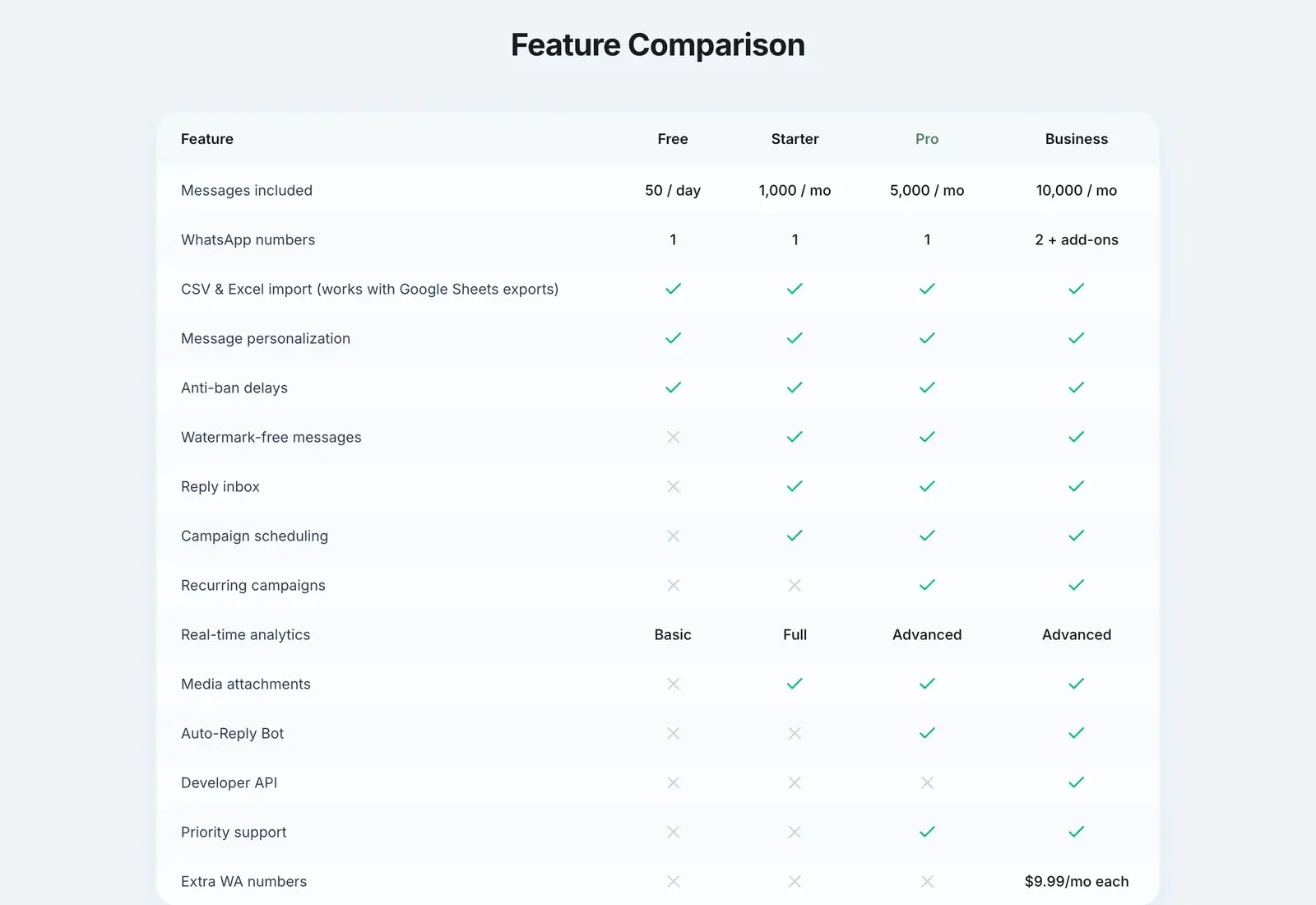
Delivery tracking on BulkWA is real-time and per recipient: sent, delivered, read, failed with the reason, and replied, kept in the campaign report and in each contact's history. The free plan shows the basics; Starter shows the full picture; Pro and Business add the advanced analytics — trends across campaigns, reply rates, and CSV export for your own reporting.
It is also the mechanism behind the safety features. Because delivery is monitored live, a drop is visible immediately rather than discovered after a number has already been restricted. That visibility is, more than any single feature, what keeps a number sending month after month.
Frequently Asked Questions
Can you see if a bulk WhatsApp message was read?+
Yes, when the recipient has read receipts enabled. WhatsApp reports a read event (the blue ticks) that a bulk tool records per recipient. If someone has turned read receipts off in their privacy settings, their message will show as delivered but never as read, even after they open it, so a campaign's read rate is always an undercount rather than an exact figure.
What is a good delivery rate for a WhatsApp campaign?+
For an opted-in list of real, current numbers, delivery rates above 90% are normal and above 95% is healthy. Some non-delivery is unavoidable — numbers that left WhatsApp, phones that are switched off, and Meta's per-user marketing cap withholding promotional messages from people who already hit their daily limit. A rate that declines across consecutive campaigns matters far more than any single campaign's figure.
Why do bulk WhatsApp messages fail to deliver?+
The most common reasons are that the number is not registered on WhatsApp, the number is formatted without a country code, the recipient's phone is offline, or your connected session dropped mid-send. A good tool distinguishes these — BulkWA reports 'Number is not on WhatsApp' and 'Session not connected' as separate failure reasons — so you can clean the list for the first and reconnect for the second rather than guessing.
Does a bulk tool see replies as well as delivery?+
The better ones do. BulkWA records whether each recipient replied and routes the reply into a dashboard inbox, so the campaign report shows sent, delivered, read, failed and replied side by side. Reply rate is arguably the most important metric of all: a campaign with 95% delivery and 0% replies was delivered to people who did not want it.
Ready to Try BulkWA?
Send bulk WhatsApp messages with personalized templates. Free to start, no credit card required.
Get Started Free