What Happens When You're Reported as Spam on WhatsApp?
TL;DR
When someone reports your WhatsApp number, WhatsApp receives the most recent messages from that chat plus your account details, and the reporter can block you too. You are not notified. WhatsApp does not publish how many reports cause a ban. Reports are weighed with other signals, and outcomes range from nothing to temporary limits to a ban.
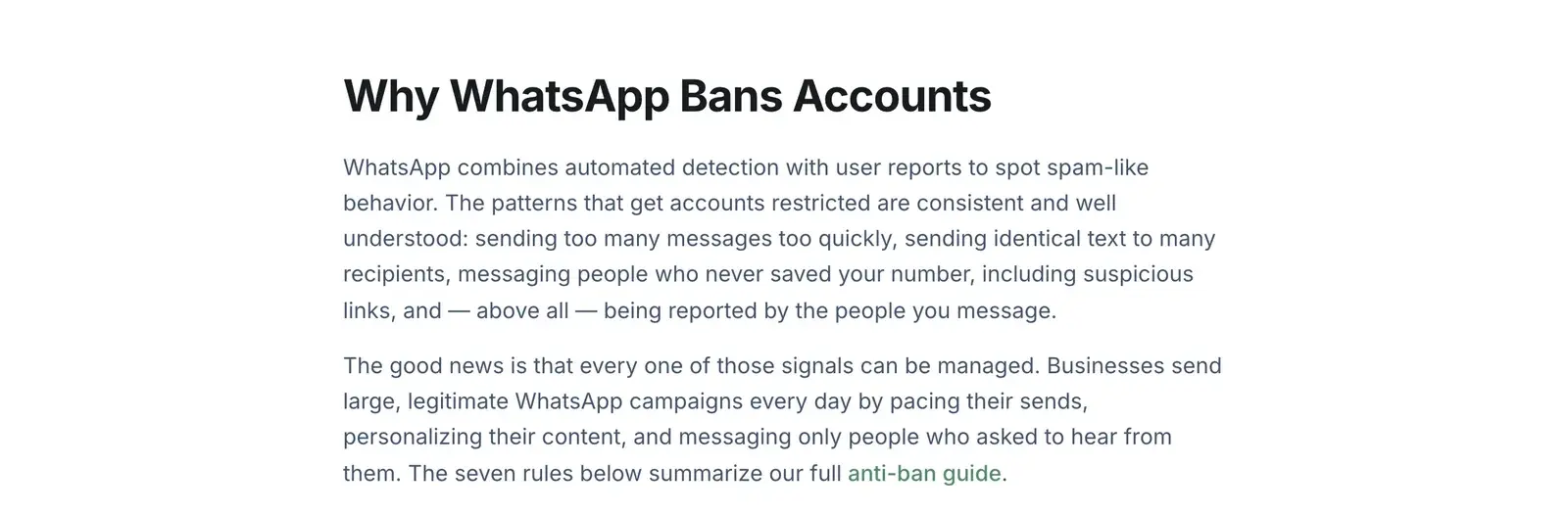
Short answer: when someone reports your number, WhatsApp gets a copy of the most recent messages from that chat plus your account details, and you get no notification at all. WhatsApp does not publish how many reports lead to a ban, and the outcome can be anything from nothing to a permanent ban.
If your number is already banned, go straight to how to appeal a WhatsApp ban. The 30-day appeal window matters more than anything here.
What Does the Person Reporting You Actually See?
Reporting takes two taps. There are a few ways in:
- From a chat with an unknown number. When someone who hasn't saved your number gets a message from you, WhatsApp usually shows Block and Report options at the top of the chat. That makes your very first message the easiest one to report.
- From the chat menu or contact info. Opening your profile or the chat menu shows a Report option near the bottom.
- From a single message. Newer app versions also let people long-press one message and report it.
When they confirm, WhatsApp typically offers to block you and delete the chat as well, shown as Report and block or as a tick box. Labels vary by phone and app version. A report plus a block is two negative signals from one person.
What Does WhatsApp Receive When You're Reported?
WhatsApp messages are end-to-end encrypted, so WhatsApp can't read your chats on its own. A report is the exception, and the reporter is the one who makes it. According to WhatsApp's help centre, the reporter's phone forwards the most recent messages from that chat (the help centre says the last five), along with the reported account's ID and information about its recent interactions with the reporter.
So whoever reviews the report sees exactly what you sent. A clear message from a business the person recognizes reads very differently from a cold blast with a link.
Does WhatsApp Tell You If Someone Reported You?
No. The reported person isn't notified, there's no report counter in the app, and WhatsApp won't tell you who reported you or how many times. If they also blocked you, you may see the usual signs of a block, such as one grey tick that never turns into two. A report on its own leaves no visible trace.
The first sign most senders get is a consequence: falling delivery, a temporary limit, or a ban screen.
How Many Reports Does It Take to Get Banned?
Nobody outside WhatsApp knows, and WhatsApp doesn't publish a number. Posts that name a specific count are guessing.
What WhatsApp does say is that it combines automated systems with user reports to detect spam. A report gets weighed against everything else your account is doing. A few reports against a number that sends a few hundred messages a week to existing customers look very different from the same reports against a week-old number blasting thousands of identical messages to strangers.
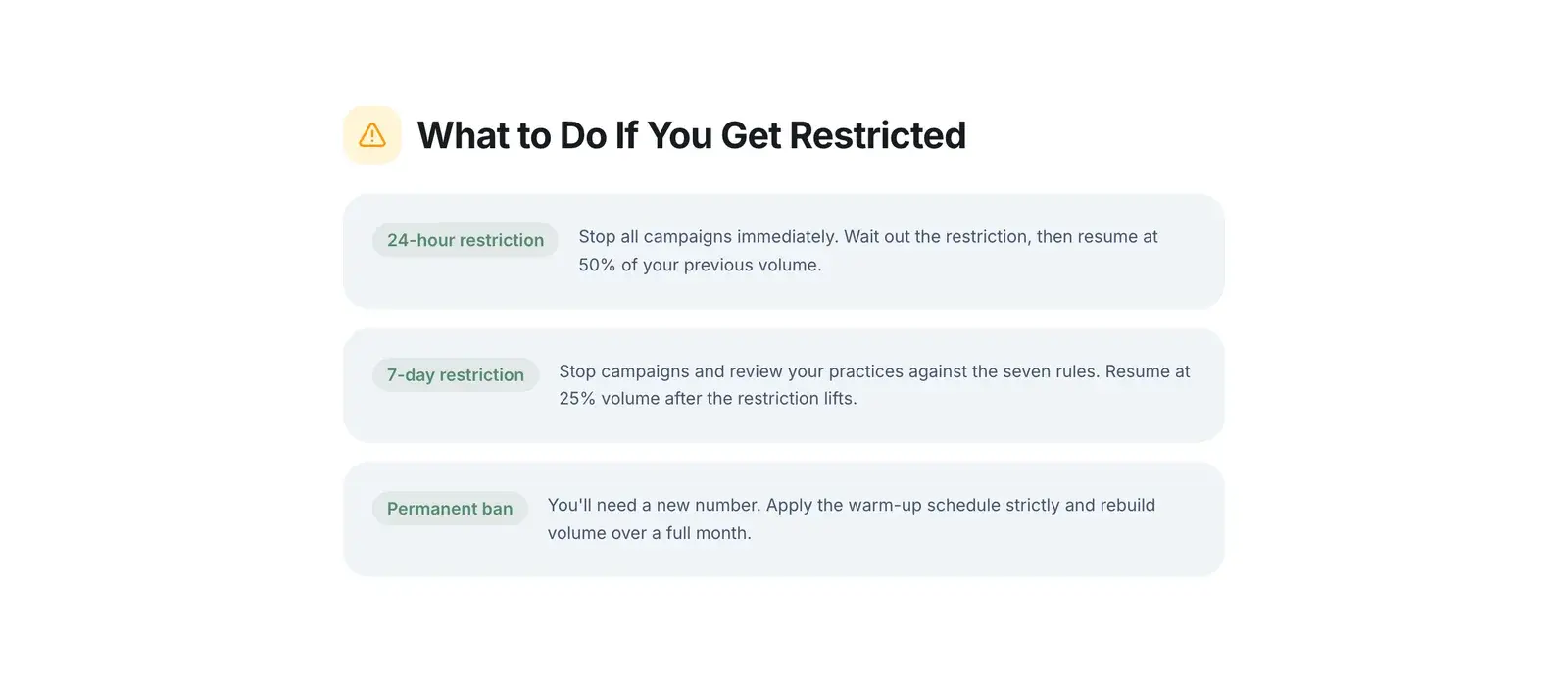
Outcomes fall roughly into three groups:
- Nothing visible. A report or two against an otherwise normal account may have no effect you can see.
- Temporary limits. WhatsApp has shown in-app notices saying an account is restricted for a period, which can stop you starting new chats until it lifts. Exact wording, scope and duration vary, and WhatsApp doesn't fully document them.
- #171c1f] font-semibold">A ban. The app shows "This account is not allowed to use WhatsApp" and logs you out. Recovery is covered in our [ban appeal guide.
Which Signals Make Reports Count for More?
These patterns are the ones most associated with spam, and each makes a report against you look more credible:
| Signal | Why it raises risk | How to reduce it |
|---|---|---|
| Reports and blocks | A recipient is saying directly that the message was unwanted | Message only people who agreed to hear from you |
| High volume from a new number | A new account has no history to balance the reports | Warm up gradually over several weeks |
| Messages sent seconds apart | Faster than a person types, so it looks automated | Keep randomized gaps of 8 to 20 seconds or more |
| Identical text to many people | Copy-paste blasts are the classic spam pattern | Personalize with name and context placeholders |
| Recipients who never saved your number | Strangers are the people most likely to report | Get them to message you first or save your number |
| Links in a first message | Unfamiliar links from unknown numbers look like phishing | Introduce yourself before sending any link |
What Does a "Report Rate" Mean for a Business?
WhatsApp doesn't show you a report rate, but think in proportions rather than totals. If you message 1,000 people and a handful report you, that's a tiny fraction of your audience. If you message 50 people and the same handful report you, that's a much bigger share, and to an automated system it looks like most people didn't want the message.
Doubling your volume to a cold list roughly doubles your reports too. A warm list keeps the share small as you grow.
How Do You Lower the Chance of Being Reported?
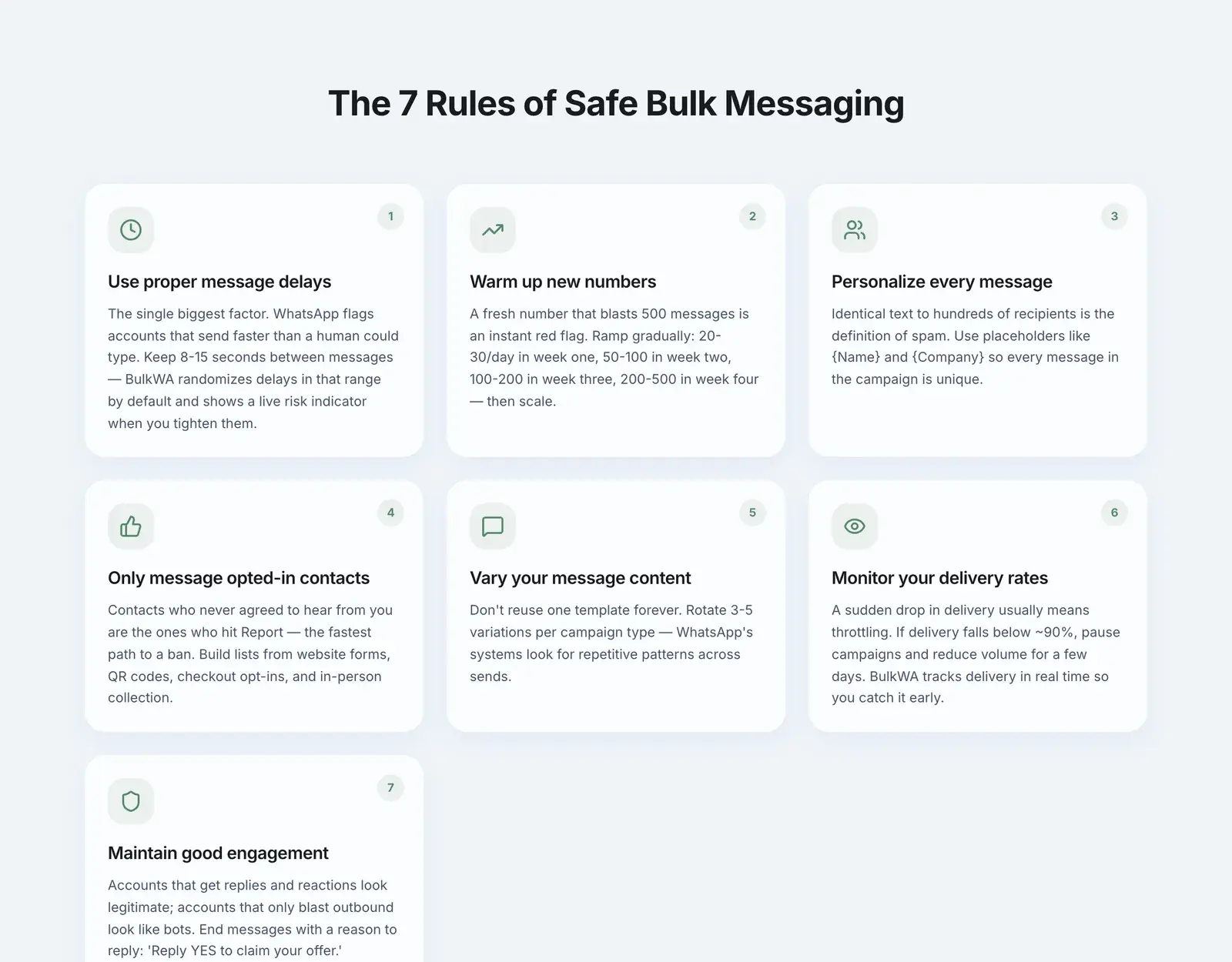
Most reports come from people who don't know why you're messaging them:
- #171c1f] font-semibold">Opt-in only. Message people who gave you their number for this purpose. Our guide to [building an opt-in list covers forms, QR codes and checkout consent.
- #171c1f] font-semibold">Let customers message you first. A click-to-chat link or QR code on your site, receipts or counter makes them start the conversation. The free [WhatsApp link & QR generator makes one in a minute, and people who started the chat rarely report it.
- Say who you are in the first line. "Hi Dana, it's Maya from Green Leaf Bakery" answers the question every recipient asks before deciding whether to report.
- Stay relevant, and not too often. Send what they signed up for, at a pace they expect.
- Make stopping easy. End with "Reply STOP to stop these messages." Someone who can unsubscribe has less reason to report.
- #171c1f] font-semibold">Write like a person. Short, specific, no shouting. Our free [WhatsApp message templates are written to sound personal.
- #171c1f] font-semibold">Warm up and slow down. New numbers need weeks of gradually rising volume. See the [number warm-up guide.
What Should You Do the Moment You Suspect Reports?
You won't get a notice, so watch for the side effects: delivery rates dropping partway through a campaign, more messages stuck on one tick, or replies saying "who is this?" or "stop".
- Pause every running and scheduled campaign.
- Check per-recipient status. If deliveries fell partway through, note where it started and what changed: a new list, a new message, a faster pace.
- Remove anyone who complained and anyone who didn't knowingly opt in.
- Look for a restriction notice in the app, and if there is one, wait it out completely.
- Resume at much lower volume with a rewritten message that names you in the first line, then build back up slowly.
What Are the Honest Risks?
Reports are the one signal you can't fully control. Someone who forgot they signed up can still report you, and because WhatsApp doesn't publish thresholds, nobody can tell you how close you are to a limit.
Sending in bulk through any unofficial tool on a regular WhatsApp number carries risk of its own. Keep every other signal clean so the reports you do get don't tip the balance. Our anti-ban rules put the full checklist in one place, and our anti-ban tips go into more depth.
Where BulkWA Fits
No tool can stop someone tapping Report, and BulkWA doesn't claim to. It reduces the other signals and handles opt-outs, so people who want out don't have to report you:
- Randomized 8 to 20 second delays between messages by default.
- Personalization placeholders such as {Name}, so no two messages are identical.
- Warm-up mode, which caps daily campaign sends on a new number, starting at 40 a day and rising over about two weeks.
- STOP handling. A reply of STOP, UNSUBSCRIBE, CANCEL, END or QUIT is recorded, the contact gets a confirmation, and future campaigns skip that number.
- Per-recipient delivery status and a reply inbox, so you spot delivery drops and complaints early.
The full list is on our features page. The free plan is $0 with 50 messages a day and no card required; campaign messages carry a small "Sent via BulkWA" note. Starter is $9/month for 1,000 messages, Pro is $29.99 for 5,000, and Business is $99 for 10,000 with two numbers. Details are on pricing. To try it, create a free account and send a small test to people who know you.
Frequently Asked Questions
Does WhatsApp tell you if someone reported you?+
No. WhatsApp does not notify the person who was reported, does not show a report count, and does not reveal who reported you. If the reporter also blocked you, you may notice the usual signs of a block, such as messages stuck on one grey tick. A report on its own leaves no visible trace. Most senders only find out indirectly, through falling delivery, a temporary restriction or a ban.
How many reports does it take to get banned on WhatsApp?+
WhatsApp does not publish a number, so any specific figure you read online is a guess. Reports are combined with other signals such as how fast and how much you send, whether your messages are identical, and whether recipients have saved your number. A few reports against a careful, established account can have no visible effect, while the same reports against a new number sending cold blasts can lead to a ban.
What does WhatsApp see when someone reports me?+
Chats are end-to-end encrypted, so WhatsApp cannot read them on its own. When someone reports you, their phone forwards the most recent messages from that chat to WhatsApp; the help centre says the last five. WhatsApp also receives your account ID and information about the account and its recent interactions with the reporter. Whoever reviews the report sees exactly what you sent, so your own message is the evidence.
What is the difference between Report and Report and block?+
Report sends your recent messages to WhatsApp for review and leaves the chat as it is. Report and block also blocks your number, so you can no longer message that person, and usually deletes the chat from their phone. Exact labels differ between Android, iPhone and app versions. For a sender, report and block is worse: it is two negative signals from the same person instead of one.
Can a bulk messaging tool stop people from reporting me?+
No. Nothing can stop a recipient tapping Report, and a tool that promises otherwise is overselling. What software can do is reduce the other signals that make reports count for more: pacing messages with randomized delays, personalizing text, limiting volume on new numbers, and honoring STOP replies so people who want out can leave without reporting you. The biggest factor is still who you message.
Ready to Try BulkWA?
Send bulk WhatsApp messages with personalized templates. Free to start, no credit card required.
Get Started Free