WhatsApp vs SMS for Appointment Reminders: Which Wins?
TL;DR
Neither wins everywhere. SMS reaches any mobile number, with or without internet or a smartphone, so it is the safer default where WhatsApp is uncommon, such as the US. WhatsApp shows delivered and read ticks, carries longer messages and invites replies where customers already use it. Many businesses send WhatsApp first and SMS the rest.
An appointment reminder has one job: reach the person in time to show up, confirm or rebook. WhatsApp and SMS both do that, but they fall short in different ways. SMS almost always lands, yet you rarely know whether anyone looked at it. WhatsApp tells you when a reminder was delivered and read, but it only reaches people who use WhatsApp, and that varies a lot by country.
How Do WhatsApp and SMS Compare for Reminders?
| Factor | SMS | |
|---|---|---|
| Reach | Only people with the app and a data or Wi-Fi connection | Any mobile number, including basic phones without internet |
| Adoption | Dominant in much of Latin America, Europe, India and Africa; much lower in the US | Works on every mobile network |
| Delivery visibility | Delivered and read ticks; read shows only if the recipient has read receipts on | Delivery reports depend on the provider; no read receipts for standard SMS |
| Message length | Long messages in one bubble, plus images and PDFs | 160 characters per segment, or 70 with emoji or non-Latin text |
| Replies | Free-form two-way chat | Two-way only if your provider supports inbound replies |
| Sender identity | Your number, plus your name or business profile | Sender ID rules vary by country |
| Cost | Per message on the official API; flat monthly plans on QR-based senders | Usually priced per message or segment by the provider |
| Compliance | Opt-in expected; honour STOP | Consent and opt-out rules; US business texting usually needs 10DLC registration |
| Main reliability risk | The sending number can be restricted or banned | Messages can be filtered by carriers |
Who Can Each Channel Actually Reach?
SMS is the lowest common denominator in the good sense: any active mobile number can receive it, on a smartphone or a basic phone, with or without mobile data. For older patients, rural customers, or anyone whose phone number is all you have, SMS is the safe bet.
WhatsApp only reaches people who have installed it and come online. In much of Latin America, Europe, India and Africa that is most of your customers. In the US, WhatsApp use is far lower, and plenty of customers will never see a WhatsApp reminder because they do not have the app.
The practical test is your own list. If you already chat with most customers on WhatsApp, it is a realistic primary channel. If you have never had a WhatsApp conversation with them, start with SMS.
Can You See Whether a Reminder Was Read?
This is WhatsApp's clearest advantage. Each message moves through sent, delivered and read, and a bulk sender can record that per recipient. Read status only appears if the recipient has read receipts switched on, so delivered but not read does not always mean ignored. Our guide to tracking campaign delivery explains each status.
Standard SMS has no read receipts. Many providers return a delivery report saying the handset received the message, but how detailed and reliable it is depends on the provider and the destination network. You know it probably arrived; you do not know whether it was opened.
For reminders that matters: a WhatsApp reminder still unread on the morning of the appointment is a signal to phone that person.
What Does Each Channel Cost?
SMS providers usually charge per message, and longer texts are billed as several segments. Rates vary by provider and country.
On WhatsApp, cost depends on how you send. The official WhatsApp Business API charges per message under Meta's rates, which vary by message category and country; our breakdown of WhatsApp API cost per message walks through them. QR-based senders such as BulkWA use flat plans with no per-message fees: Free gives 50 messages a day, Starter is $9 a month for 1,000 messages, Pro $29.99 for 5,000 and Business $99 for 10,000.
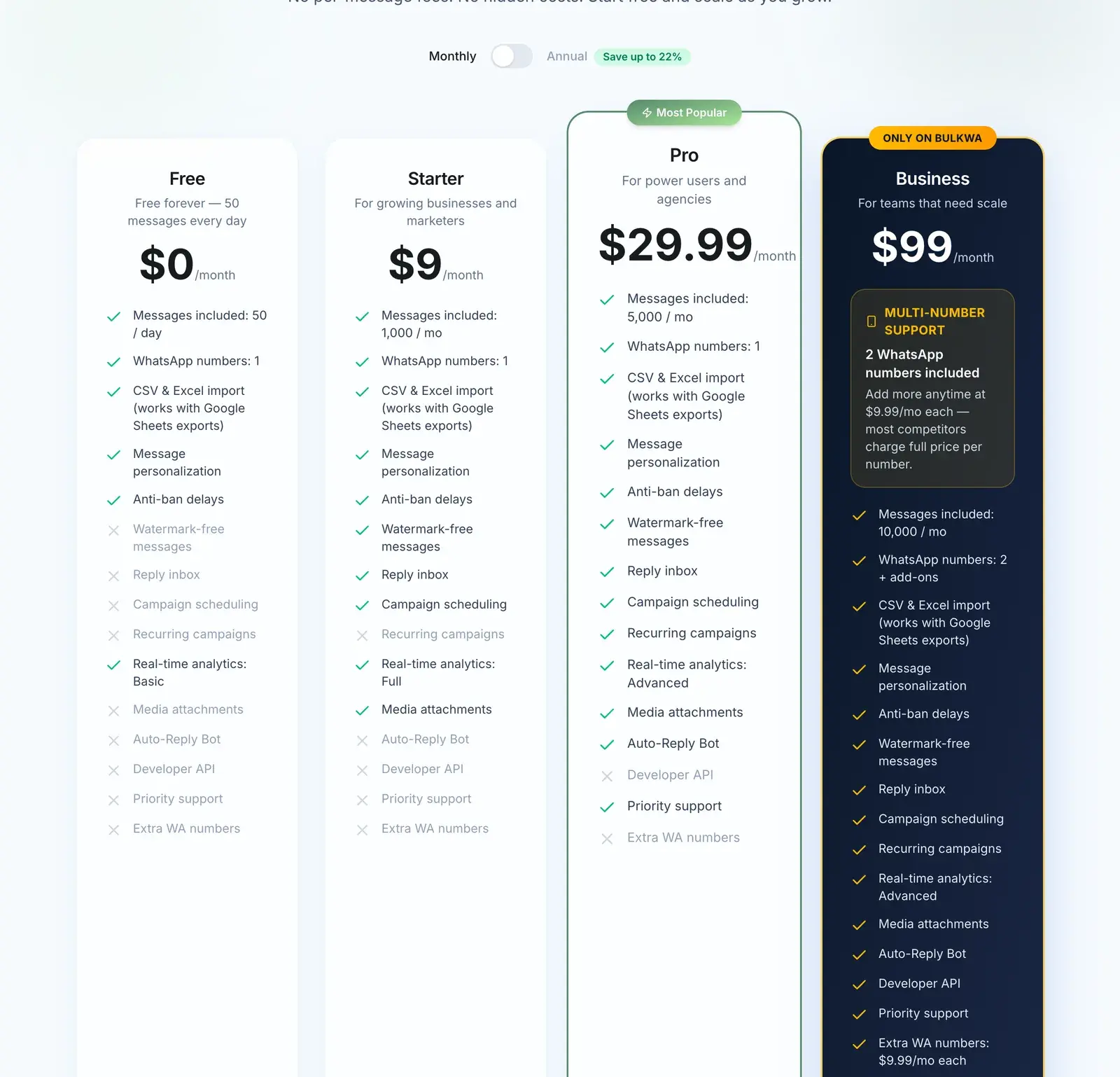
A practice sending 20 reminders a working day, about 440 a month, fits on Starter. Details are on pricing.
What Fits in One Message?
An SMS segment holds 160 characters in the standard GSM-7 alphabet. One emoji, one character outside that set, or any non-Latin script switches the message to Unicode, and the limit drops to 70 characters. Longer messages are split and billed as multiple segments. A reminder with name, date, time, address and a reply instruction can easily run to two.
WhatsApp has no practical length problem for a reminder, supports emoji and every script, and can carry a map link, a PDF of preparation instructions or a photo of the entrance. Whether a link shows a preview varies.
Which Channel Has More Compliance Work?
Both need consent. In the US, business texting falls under the TCPA, and sending application-to-person SMS from a standard 10-digit number generally requires 10DLC brand and campaign registration through your provider. Rules elsewhere differ. This is not legal advice.
On WhatsApp, have opt-in before you send and stop messaging anyone who asks. BulkWA treats a reply of STOP, CANCEL, END, QUIT or UNSUBSCRIBE as an opt-out and skips that person in future campaigns, including STOP replies that arrive while your number is offline.
Which Should You Use?
- Choose WhatsApp first if most customers already message you there, you want to see who read the reminder, or your reminders carry directions or attachments.
- Choose SMS first if your customers are mainly in the US or another low-WhatsApp market, many are older or on basic phones, or you cannot risk the reminder number being restricted.
- Use both if your list is mixed, which most are.
How Do You Use WhatsApp and SMS Together?
The common pattern is WhatsApp first, then SMS for everyone it could not reach:
- #171c1f] font-semibold">Import tomorrow's appointments and send the WhatsApp reminder campaign. Format numbers internationally first with the [number list cleaner.
- Open the campaign report. Before each send, BulkWA checks whether the number is registered on WhatsApp. When the answer is a definite no, the recipient is marked failed with the reason "Number is not on WhatsApp" and nothing is sent. If the check is inconclusive, BulkWA sends anyway.
- Download the report as CSV. Export is on paid plans; Free can view the report on screen. The file lists phone, name, status, replied, sent time and error message.
- Filter for "Number is not on WhatsApp" and load those numbers into your SMS tool. Leave out rows marked "Recipient opted out (STOP)", and check other failure reasons before retrying them on WhatsApp.
- Phone anyone still unread on the morning of the appointment.
Confirmations come back to the reply inbox on Starter and above. For the full daily routine, see our clinic appointment reminder workflow and the clinics and salons use case.
What Are the Risks of Sending Reminders on WhatsApp?
SMS's main risk is carrier filtering. WhatsApp's main risk sits on your number.
- Unofficial connection. BulkWA pairs by QR code, like WhatsApp Web, not through the official Business API. WhatsApp does not approve this, and a restricted number sends nothing.
- The risk is on your number. If it is the number printed on your appointment cards, a ban hurts. Some businesses pair a dedicated reminder number instead.
- Opt-in only. People who asked for reminders rarely report them.
- Keep the 8–20 second gaps. BulkWA's server spaces sends a random 8–20 seconds apart, so 40 reminders take about 9 minutes.
- Warm up a new number, starting around 20 to 30 messages a day in week one.
- Personalise with name, date and time so no two messages are identical.
- Honour STOP every time.
The full checklist is in our anti-ban rules. For another channel comparison, see WhatsApp vs email marketing.
Where BulkWA Fits
BulkWA handles the WhatsApp half: personalised reminders from your own number, delivered and read status per recipient, replies in one inbox, and a CSV of the numbers that are not on WhatsApp so your SMS tool can reach them. It does not send SMS itself.
To try it, create a free account and send a test batch to staff phones, or compare the features.
Frequently Asked Questions
Is WhatsApp better than SMS for appointment reminders?+
It depends on where your customers are. If most of them already use WhatsApp, it gives you delivered and read status, longer messages and easy replies. If many are in the US, older, or on basic phones, SMS reaches more of them because it needs no app or internet. For a mixed list, send WhatsApp first and SMS the numbers that are not on WhatsApp.
Does BulkWA send SMS reminders too?+
No. BulkWA sends WhatsApp messages only, from your own number paired by QR code. What it does is mark every recipient whose number is not registered on WhatsApp as failed with the reason Number is not on WhatsApp. On paid plans you can download the campaign report as CSV, filter those rows and import them into whatever SMS provider you already use.
Can I tell whether an SMS reminder was read?+
Not with standard SMS. There are no read receipts. Many SMS providers return a delivery report saying the handset received the message, but the detail and reliability depend on the provider and the destination network. WhatsApp shows read status when the recipient has read receipts switched on, so a reminder still unread on the morning of the appointment is a useful cue to phone.
Do I need 10DLC registration to send reminder texts in the US?+
Generally yes, if you send application-to-person SMS from a standard 10-digit number. Carriers expect the brand and the campaign to be registered through your SMS provider, and unregistered traffic may be filtered or blocked. Toll-free and short-code numbers have their own verification processes. Rules change, so confirm the current requirements with your provider. This is not legal advice.
What happens to people who reply STOP to a WhatsApp reminder?+
BulkWA records a reply of STOP, CANCEL, END, QUIT or UNSUBSCRIBE as an opt-out and skips that person in future campaigns, including STOP replies that arrived while your number was offline. In the campaign report they show as failed with the reason Recipient opted out (STOP). Do not move those people to SMS; they asked you to stop.
Ready to Try BulkWA?
Send bulk WhatsApp messages with personalized templates. Free to start, no credit card required.
Get Started Free