Is WhatsApp Business Free? What Costs Money and What Doesn't
TL;DR
Yes, the WhatsApp Business app is free to download and use, including its business profile, catalog, quick replies, away messages, labels and 256-contact broadcast lists. Costs start elsewhere: Meta Verified is an optional monthly subscription, and the WhatsApp Business Platform (API) charges per delivered template message, usually plus a provider's subscription.
The short answer is yes: the WhatsApp Business app is free, and it is free in the honest sense. No trial, no message fees, no card. The confusion comes from the fact that "WhatsApp Business" is used for three different things, and only one of them is free.
This guide maps the whole ecosystem: what the free app actually covers, where Meta starts charging, and the costs that do not appear on anyone's pricing page.
What Does the Free WhatsApp Business App Include?
The WhatsApp Business app for Android and iOS is the regular WhatsApp app with business tools added. All of these are included at no cost:
- Business profile with your address, hours, website, category and description
- Catalog so customers can browse products inside the chat
- Quick replies for answers you type every day
- Greeting and away messages that send automatically
- Labels to sort chats into stages such as new, pending and paid
- Broadcast lists of up to 256 recipients per list
The broadcast limit is where most people first feel the edge of "free". A broadcast only reaches contacts who have saved your number in their own phone. Anyone who has not saved it simply does not get the message, and the app does not tell you. For a full feature-by-feature comparison with the API, see WhatsApp Business app vs API.
Where Does WhatsApp Business Start Costing Money?
There are two paid products from Meta, and they solve very different problems.
Meta Verified for business. An optional monthly subscription, with a price that varies by country. It adds a verified badge and access to account support. It is about trust and support. It does not raise the broadcast limit or add any sending features.
#171c1f] font-semibold">The WhatsApp Business Platform (API). This is not an app. It is an interface your software or a Business Solution Provider (BSP) such as Wati or Twilio connects to. Since July 1, 2025, Meta charges [per delivered template message, priced by the recipient's country and the message category: marketing, utility or authentication. Under Meta's published rules, replies inside the 24-hour customer service window that opens when a customer messages you are free. Business-initiated messages, which is what campaigns are, use paid templates.
On top of Meta's fees, most BSPs charge their own subscription for the dashboard and inbox. That is two bills. We will not quote per-message rates here because they change and vary by country; the current figures are on Meta's rate card. For worked cost examples, see WhatsApp bulk sender pricing.
What Does Each Option Cost? The Full Map
| Option | Cost | What you get | Main limit |
|---|---|---|---|
| WhatsApp app | Free | Personal chats, groups, broadcast lists | No business profile or business tools |
| WhatsApp Business app | Free | Profile, catalog, quick replies, greeting and away messages, labels, broadcasts | 256 per broadcast, only to people who saved your number |
| Meta Verified for business | Monthly subscription, price varies by country | Verified badge and account support | Adds no sending volume or automation |
| Business Platform (API) via a BSP | Meta fee per delivered template message, plus the BSP subscription | Official access, team inboxes, integrations, approved templates | Two bills, verification and template approval |
| BulkWA Free (QR-based) | $0 | 50 messages a day from your own number, CSV import, personalization, anti-ban delays | One number, Sent via BulkWA note, unofficial connection |
| BulkWA paid (QR-based) | $9 to $99 a month flat, no per-message fees | 1,000 to 10,000 messages a month, reply inbox, scheduling | Unofficial connection, ban risk on your number |
| wa.me link tools | Free, no signup | Click-to-chat links, QR codes, message templates, manual sending | Every message is sent by hand |
What Are the Hidden Costs of "Free"?
Even the free options cost something. Three costs catch people out.
A second number. A phone number can only be registered to one WhatsApp account at a time. If you want to keep your personal WhatsApp and run a separate business number, you need a second SIM or eSIM, and sometimes a second phone. That line has a monthly bill.
Time. Free broadcast lists mean maintaining several lists of 256 and chasing people to save your number. Free wa.me sending means one click per contact. At 30 contacts that is fine. At 600 it is an afternoon, every time.
Ban risk on unofficial tools. Any tool that automates sending outside the official API puts your number at risk. If that number is the one on your shop window and your invoices, losing it costs far more than any subscription.
When Does Free Stop Being Enough?
The free Business app is enough for many businesses for a long time. It usually stops being enough when:
- Your list passes 256, or too many customers never saved your number
- You start conversations more than you reply to them, such as reminders, offers and follow-ups
- Each message needs a name or a detail that differs per customer
- You need to send at a set time without holding the phone
- Several people need to answer, which points toward the API
If you only need to send occasionally to a few dozen people, the free route still works. Our guide to sending bulk WhatsApp for free covers the methods, and the free bulk sender turns a pasted list into personalized wa.me links you send one by one, with no signup. The free WhatsApp link and QR generator and free message templates help too, and you can see all free tools in one place.
What Are the Risks of a QR-Based Bulk Sender?
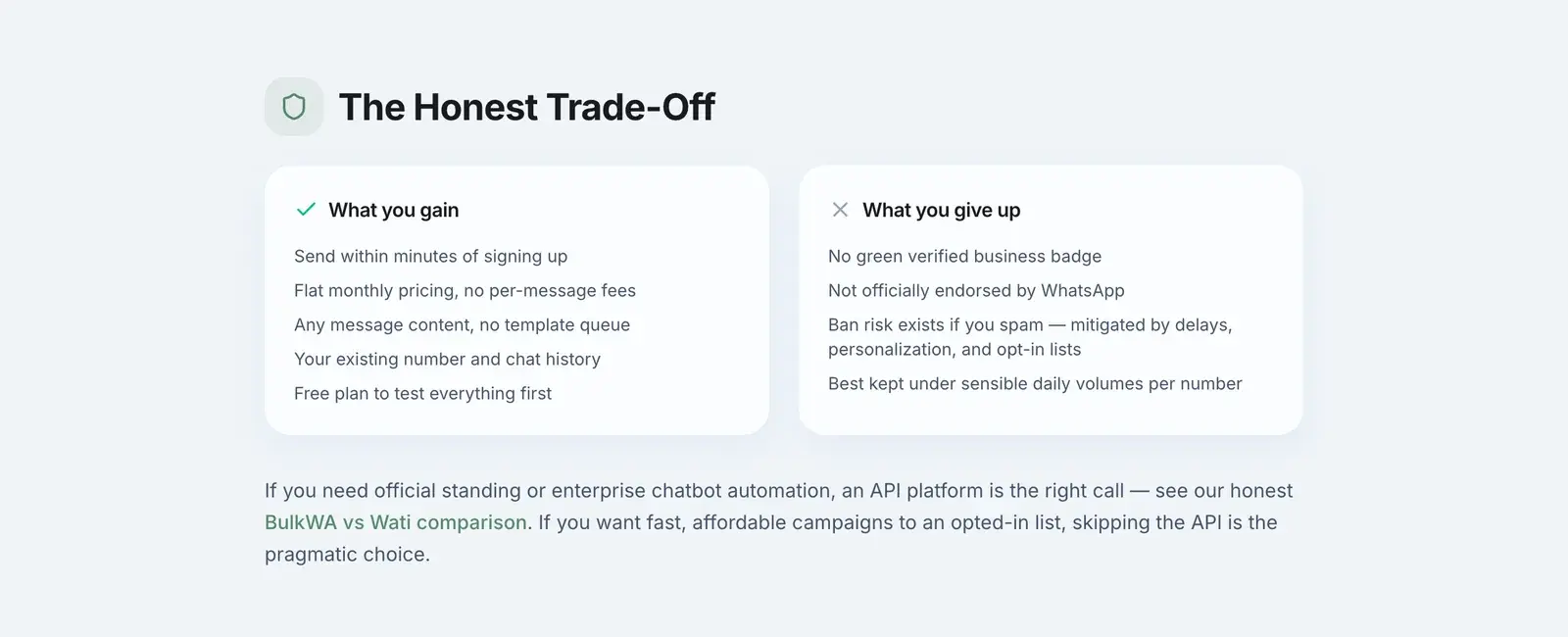
Be clear about what you are choosing. A QR-based sender pairs with your WhatsApp number the same way WhatsApp Web does. It is an unofficial connection, not the Business API, and the ban risk sits on the number you pair, not on the vendor.
What keeps that risk down:
- Opt-in only. Message people who agreed to hear from you. Reports from recipients are the fastest route to a restriction.
- Slow, randomized sending. BulkWA waits a random 8 to 20 seconds between messages by default. A list of 500 takes well over an hour.
- Warm up a new number. Start small and build volume over days, not in one campaign.
- Personalize. Hundreds of identical messages look automated. A name and a relevant detail make each one a real message.
- Make leaving easy. End with "Reply STOP to stop these messages". BulkWA unsubscribes anyone who replies STOP automatically.
The full list is in our anti-ban rules.
Where BulkWA Fits
If the free WhatsApp Business app does what you need, keep using it. It is free, it is official, and it is good.
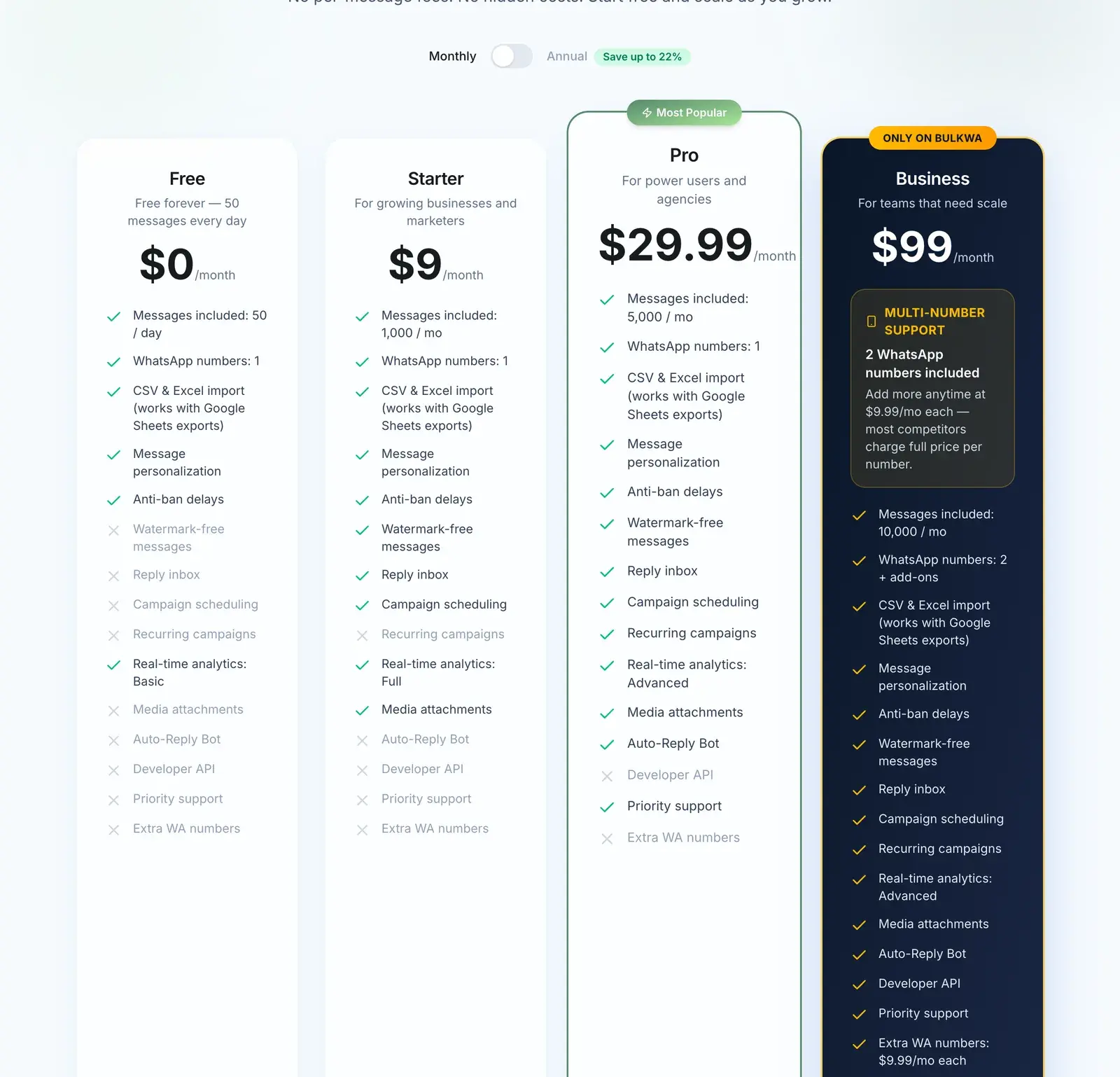
BulkWA fits the gap between a 256-contact broadcast and an API with two bills. You pair your existing number by QR, import contacts from a CSV or Excel file, personalize each message, and send at a human pace. The free plan gives you one number and 50 messages a day, with a Sent via BulkWA note on campaign messages. Paid plans are flat: Starter is $9 a month for 1,000 messages, Pro is $29.99 for 5,000, and Business is $99 for 10,000 with two numbers and API access. Annual billing lowers each one, and there are no per-message fees. Details are on the pricing page, and the full list is on features.
You can create a free account and test a send this week. What we will not claim is that this is endorsed by WhatsApp. It is not. Send only to people who asked to hear from you, and send slowly.
Frequently Asked Questions
Is the WhatsApp Business app really free?+
Yes. The WhatsApp Business app for Android and iOS costs nothing to download or use. The business profile, catalog, quick replies, greeting and away messages, labels and broadcast lists are all included. Meta does not charge per message inside the app. The only optional paid add-on is Meta Verified, a monthly subscription whose price varies by country.
Is the WhatsApp Business API free?+
No. Since July 1, 2025, Meta charges for each delivered template message sent through the WhatsApp Business Platform, priced by the recipient's country and the message category: marketing, utility or authentication. Free-form replies inside the 24-hour customer service window are free up to 1,000 delivered service messages per number a month; since October 1, 2026, Meta charges for service messages beyond that. Most businesses also pay a provider subscription on top.
What does Meta Verified cost for WhatsApp Business?+
Meta Verified for business is an optional monthly subscription, and the price varies by country, so check the current figure inside the WhatsApp Business app for your region. It adds a verified badge and access to account support. It does not raise the 256-contact broadcast limit or add bulk sending, scheduling or automation, so it solves a trust problem, not a volume problem.
Can I send bulk messages for free with WhatsApp Business?+
Up to a point. Broadcast lists in the WhatsApp Business app are free but reach at most 256 contacts per list, and only people who saved your number receive them. Free wa.me tools let you send one by one by hand. BulkWA's free plan sends 50 automated messages a day from your own number, with a Sent via BulkWA note on each campaign message.
Do I need a second phone number for WhatsApp Business?+
Only if you want to keep your personal WhatsApp. A phone number can be registered to one WhatsApp account at a time, so a separate business identity needs its own number, which usually means a second SIM or eSIM. That line is a real monthly cost. If you are happy to switch your existing number to the Business app, you can keep your chat history and pay nothing extra.
Ready to Try BulkWA?
Send bulk WhatsApp messages with personalized templates. Free to start, no credit card required.
Get Started Free