How to Set Up a WhatsApp Auto-Reply Bot for Keywords (Without the API)
A keyword auto-reply bot answers WhatsApp messages automatically when they contain words you choose. How the rules work, what to automate and what not to, and how to do it without the Business API.
Quick answer
A WhatsApp keyword auto-reply bot watches incoming messages and sends a pre-written reply when a message contains a keyword you defined — 'PRICE', 'HOURS', 'MENU', 'STOP'. On BulkWA you create rules with the keyword, the match type, the reply text and an optional business-hours window, and the bot runs on your connected number without the WhatsApp Business API. The essential rule every business needs is STOP, which unsubscribes the sender automatically.
Most of the messages a small business receives on WhatsApp are the same five questions. What time do you close, how much is it, where are you, can I book, and — the one that matters most — please stop. A keyword auto-reply bot answers those instantly and hands everything else to a human.
The WhatsApp Business app gives you a greeting and an away message. That is two rules. Here is what more than two looks like, and how to do it on your own number without the Business API.
How a Keyword Rule Works
A rule has four parts:
- The keyword(s). One or more words to watch for — "hours", "opening", "open".
- The match type. Exact match ("the whole message is HOURS"), contains ("the message includes hours"), or starts-with. Contains is usually right for questions; exact is right for commands like STOP.
- The reply. What to send back. Plain text, and it can include placeholders if you have the person's details.
- The window. When the rule is active — all the time, only outside business hours, or only inside them.
On BulkWA you create rules from the Auto-Reply page, set the timezone once, and toggle rules on and off individually. Each rule shows how many times it has fired, so you can see which questions people actually ask.
The Rules Every Business Should Have
STOP. Non-negotiable, and it does two things: confirms the opt-out to the person, and suppresses the number from every future campaign. On BulkWA, STOP handling is automatic on every plan including Free, and it survives future spreadsheet imports — so someone who opted out in March does not reappear when you upload a fresh export in June. That last part is where most home-grown solutions fail.
HOURS / OPEN. "We're open Mon–Sat 9am–6pm. Reply BOOK to reserve a time."
PRICE / PRICES / COST. Either the answer or a link to it. If prices depend on the situation, say so and hand off: "Prices vary by size — reply with what you're after and someone will quote you today."
LOCATION / ADDRESS / WHERE. The address and a maps link.
BOOK / APPOINTMENT. A booking link, or the information you need to make one.
HELP. Lists the keywords. This is what people send when they do not know what to send.
An after-hours rule. Active only outside business hours: "Thanks for messaging — we're closed right now and will reply first thing tomorrow. For hours reply HOURS." Set the window correctly, or it fires at 2pm.
What Not to Automate
A bot that tries to do too much is worse than none. Leave these to a person, and have the bot say so:
- Complaints. "I'm sorry to hear that — a team member will reply personally within the hour" is an acceptable automated holding reply. An automated resolution is not.
- Refunds, cancellations, disputes. Anything with money or emotion attached.
- Anything medical, legal or safety-related.
- Replies to a campaign that asked a question. If your campaign said "reply YES to confirm", the YES replies need a human or a specific rule — not the generic bot.
The tell of a badly configured bot is that it answers messages that were clearly not questions. Match on specific keywords, not on "any message".
Keeping It From Being Annoying
Three settings separate a helpful bot from an irritating one:
Rate limiting. One person should not get the same automated reply five times in five minutes because they sent five messages. BulkWA limits how often a rule fires per contact.
Business-hours awareness. The after-hours message should only send after hours. The timezone matters — set it.
Not replying to yourself. A bot must ignore outbound messages and messages from your own campaigns, or it starts conversations with itself. This sounds obvious and is a common failure in DIY setups.
Where BulkWA Fits
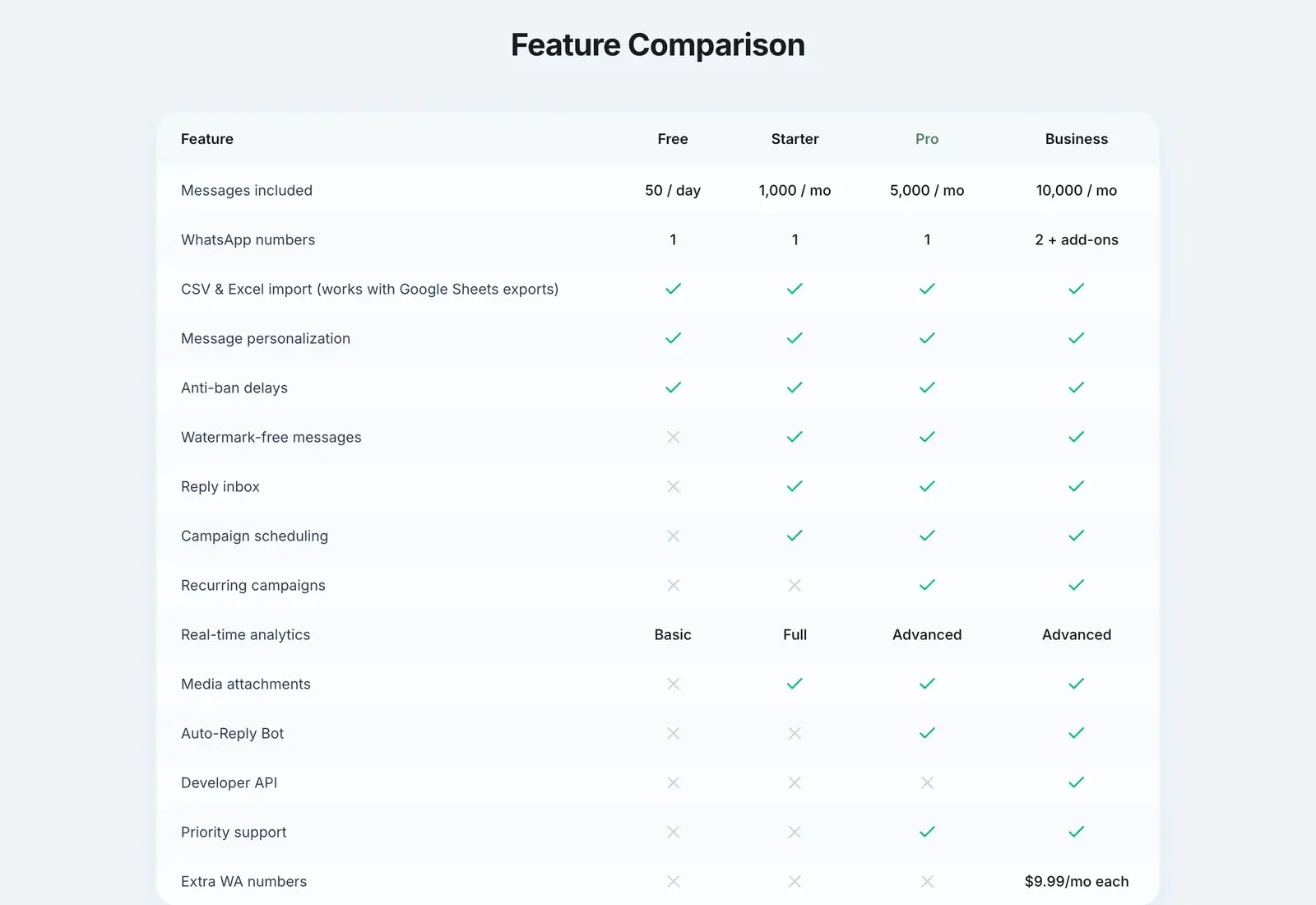
The auto-reply bot is included on BulkWA's Pro and Business plans: unlimited keyword rules, contains/exact/starts-with matching, per-rule business-hours windows in your timezone, per-contact rate limiting, and a fire count per rule so you can see what people actually ask. Replies the bot does not handle land in the dashboard inbox with the full conversation thread, so the hand-off to a human keeps context.
STOP handling is separate and universal: every plan, including Free, suppresses opt-outs automatically and permanently.
The honest limit: this is keyword matching, not a conversational chatbot. It does not understand intent, look things up in your database, or hold a multi-step dialogue. If you need that, the WhatsApp Business API with a chatbot platform is the right tool. For the five questions that make up most of a small business's inbox, keyword rules on your own number are faster to set up, cost nothing per conversation, and answer at 3am.
Frequently Asked Questions
Can I set up auto-replies on WhatsApp without the Business API?+
Yes. The free WhatsApp Business app offers a single greeting message and a single away message, and QR-based tools like BulkWA go further with keyword rules that trigger different replies for different words, business-hours windows and automatic opt-out handling — all running on your existing number without the API. Full conditional chatbots with database lookups remain an API-only capability.
What keywords should a WhatsApp auto-reply bot handle?+
Start with STOP for opt-outs, which is non-negotiable. Then the questions you answer most often by hand: HOURS, PRICE or PRICES, MENU, LOCATION or ADDRESS, BOOK, and a catch-all like HELP that lists the available keywords. Do not automate anything that needs judgement — a complaint, a refund request or a medical question should reach a person, and the bot should say so.
Does an auto-reply bot reply to every message?+
It should not. A bot that answers every incoming message — including replies to your own campaigns and ongoing human conversations — generates noise and irritates people. Good rules match on specific keywords, respect a business-hours window so the after-hours reply only fires after hours, and rate-limit so one person cannot trigger the same reply repeatedly in a short period.
How does STOP opt-out work with an auto-reply bot?+
When someone replies STOP (or a variant like UNSUBSCRIBE), the rule sends a short confirmation and, more importantly, adds that number to a suppression list so no future campaign reaches them. On BulkWA this is automatic on every plan and survives later contact imports, so a person who opted out is not accidentally re-added the next time you upload a spreadsheet.
Ready to Try BulkWA?
Send bulk WhatsApp messages with personalized templates. Free to start, no credit card required.
Get Started Free