Can You Add Buttons or Links to Bulk WhatsApp Messages?
TL;DR
Tappable buttons need the official WhatsApp Business Platform (API), and marketing templates with buttons need Meta's approval first. Messages sent from the regular or Business app, and from QR-based tools like BulkWA, are plain messages. Links in them are still tappable, and numbered options such as "Reply 1 or 2" do most of what a button does.
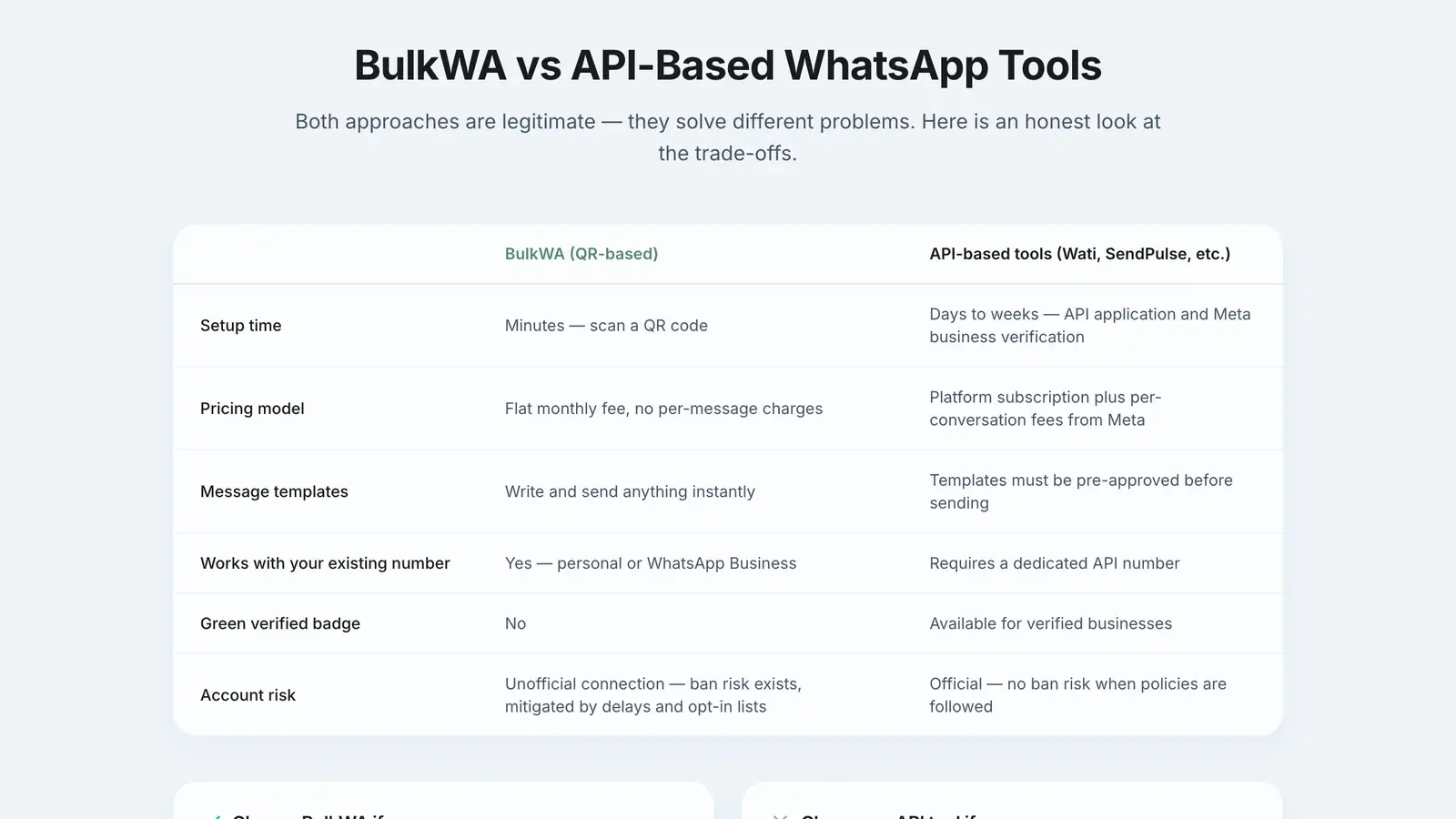
If you have seen a WhatsApp message from an airline or a bank with neat buttons underneath, "Check in", "Track order", "Yes, confirm", it is natural to want the same in your own campaign. For the order-update case specifically, see sending WhatsApp order and shipping updates. The short version: those buttons come from the official WhatsApp Business Platform, and a message sent from your own number through the app, or through a QR-paired tool, cannot carry them. Links still work, though, and with a little structure a plain message gets you most of the way there.
What Can a Bulk WhatsApp Message Contain Without the API?
A message sent from the regular WhatsApp app or the WhatsApp Business app is an ordinary chat message. Anything that sends through that same connection, including QR-based tools like BulkWA that pair the way WhatsApp Web does, sends the same kind of message. That gives you:
- Text, with WhatsApp's own formatting: wrap a word in single asterisks for bold, underscores for italic, tildes for strikethrough, and three backtick characters on each side for monospace
- Links, which WhatsApp makes tappable when they start with https:// or are written as a recognisable domain
- Media with a caption: images, videos and PDFs (in BulkWA, media attachments are on Starter and above)
- Contact cards and locations, which the app itself can share
What you cannot send this way: quick-reply buttons, call-to-action buttons that open a URL or dial a number, list menus and product carousels. Those are interactive message types of the API.
Why Do Buttons Need the Official API?
Interactive messages are features of the WhatsApp Business Platform, which you access through Meta directly or through a provider. Marketing messages sent to people who have not messaged you in the last 24 hours must use a pre-approved template, and buttons are part of that template, so they are reviewed before you can send them. You also pay per message on the API.
That trade is worth it for some businesses and not for others. We go through the full comparison in WhatsApp Business app vs API. This guide is for people who are sending from their own number and want to know what they can do instead.
What Are the Workarounds for Buttons?
| What you want | Official API | Regular/Business app & QR tools | Workaround |
|---|---|---|---|
| Quick-reply buttons | Yes, in approved templates | No | Numbered options: Reply 1 or 2 |
| Visit-website button | Yes, call-to-action URL button | No | A plain link, which is tappable |
| Call-us button | Yes, call-to-action phone button | No | Write the number in full; most phones make it tappable |
| List menu | Yes, list messages | No | A short numbered list in the text |
| Per-customer link | Yes, dynamic URL in template | No button, but links work | A link column used as a placeholder |
| Click tracking | Depends on the provider | Not built in | UTM parameters read in your own analytics |
| Chat-with-us button on a website | Not needed | Not needed | A wa.me link with pre-filled text |
Numbered replies instead of quick-reply buttons
"Reply 1 to confirm or 2 to reschedule" is the oldest workaround and still the best. It works on every phone and every WhatsApp version, and a one-character reply is about as easy as a tap.
Replies land in the reply inbox on Starter and above. On Pro and Business, the keyword auto-reply bot can answer them for you: a rule for 1 set to Exact match sends one fixed reply, a rule for 2 sends another. Use Exact for single digits, because a Contains rule for 1 would also fire on "my order number is 2214". The bot sends at most one automatic reply per contact per minute, and the reply text is fixed, without placeholders. Setup is in our keyword auto-reply guide.
One trap: a reply that is only STOP, UNSUBSCRIBE, CANCEL, END or QUIT is treated as an opt-out, before any keyword rule is checked. Never offer "Reply CANCEL" as an option, or a customer cancelling an appointment will unsubscribe from everything.
Personalised links instead of URL buttons
Every column in your CSV or Excel file becomes a placeholder. Add a column called OrderLink with each customer's tracking page, booking page or invoice, and write {OrderLink} in the message. Each recipient gets their own link. More patterns in how to personalize bulk WhatsApp messages.
On link previews: in WhatsApp, the preview card is generated by the sending client from the site's preview tags, and recipients' settings and connection affect how it shows. BulkWA's current build sends campaign text without a generated preview card. The link is still tappable. If you want something visual, attach your own image (Starter and above) and put the link in the caption, as covered in sending bulk WhatsApp media.
wa.me links instead of a chat button
For your website, email footer or a printed flyer, a wa.me link opens a chat with your number and can pre-fill the first message. It is the closest thing to a "chat with us" button you can build without the API. Our free WhatsApp link & QR generator makes the link and a QR code for it.
Can You Track Who Clicked a Link?
Not inside BulkWA. It reports, per message, whether it was sent, delivered, read or failed, which we explain in how to track WhatsApp campaign delivery. It does not shorten or rewrite your links and does not count clicks.
Measure clicks where they land instead. Add UTM parameters to the link, for example yourshop.com/sale?utm_source=whatsapp&utm_campaign=spring_sale, and the visits appear in your website analytics under that source and campaign. If you put a customer ID in a personalised link column, you can see which customers clicked, provided your own site records it.
What Do Good Button-Free Messages Look Like?
Appointment confirmation
"Hi {Name}, your appointment at Northside Physio is on {Date} at {Time}. Reply 1 to confirm or 2 if you need another time. Reply STOP to stop these reminders."
Order update with a personal link
"Hi {Name}, your order {OrderID} has shipped. Track it here: {OrderLink} Questions? Just reply to this message."
Offer with a choice
"Hi {Name}, our spring sale starts Friday. Reply 1 for the women's collection or 2 for men's and we'll send you the right page. Or see everything at yourshop.com/sale?utm_source=whatsapp&utm_campaign=spring_sale"
Our free message templates include many more written in the same Reply YES or Reply 1 style.
What Are the Risks?
A QR-based sender is an unofficial connection to WhatsApp, not the official API, and the risk sits on the number you pair. Links add their own risk: a first message containing an unfamiliar domain or a link shortener is the kind of thing people report. It is commonly advised to use readable links on your own domain and keep bit.ly and similar out of cold messages.
What keeps a number healthy:
- Opt-in only. Message people who agreed to hear from you. Reports are the fastest route to a restriction.
- Slow, randomized sending. BulkWA waits a random 8 to 20 seconds between messages by default.
- Warm up a new number with small sends before larger ones.
- Personalise so each message is different, not hundreds of identical copies.
- Offer STOP in every campaign and respect it. BulkWA handles STOP replies automatically on every plan.
The full list is in our anti-ban rules.
Where BulkWA Fits
If you need real buttons in marketing messages, the official API is the right tool, and we would rather you use it than fake it.
If you want to send personalised messages from the number your customers already know, BulkWA pairs it by QR, imports your list from CSV or Excel, and sends each person their own text, link and, on Starter and above, image or PDF. Numbered replies come back to the inbox, and on Pro the keyword bot answers the routine ones.
The free plan includes 50 messages a day, with a "Sent via BulkWA" note on campaign messages, enough to test a Reply 1 or 2 campaign on a few customers. Compare plans on pricing, browse the features, or create a free account without a card.
Frequently Asked Questions
Can I send WhatsApp quick-reply buttons without the API?+
No. Quick-reply buttons, call-to-action buttons and list menus are message types of the official WhatsApp Business Platform. The regular app, the Business app and QR-based tools that pair like WhatsApp Web send ordinary messages, so there is nothing to tap except links. The usual substitute is a numbered option such as "Reply 1 to confirm or 2 to reschedule", which works on every phone.
Are links in bulk WhatsApp messages clickable?+
Yes. WhatsApp turns a full web address into a tappable link, and most domains written without https:// are linked too. A preview card is a separate thing: it depends on the sending client and the site's preview tags. BulkWA's current build sends campaign text without a generated preview card, so if you want a visual, attach your own image with the link in the caption.
Does BulkWA track link clicks?+
No. BulkWA reports whether each message was sent, delivered, read or failed, but it does not rewrite links or count clicks. To measure clicks, add UTM parameters to the link, for example utm_source=whatsapp and utm_campaign=spring_sale, and read the visits in Google Analytics or whatever analytics your website uses. A personalised link column lets you attribute visits to individual customers.
Should I use a link shortener like bit.ly in a WhatsApp campaign?+
It is commonly advised not to, especially in a first message to someone. A short link hides where it goes, recipients are wary of it, and shorteners are widely used in spam, which can raise the chance that people report you. A readable link on your own domain looks like what it is. If you need a shorter path, set up a short page on your own site.
Can I use CANCEL as a reply option in a WhatsApp campaign?+
Not with BulkWA. A reply that is only STOP, UNSUBSCRIBE, CANCEL, END or QUIT is treated as an opt-out, and that contact is unsubscribed from future campaigns. A customer who replies CANCEL to cancel a booking would be removed from every message after it. Use numbers instead: "Reply 1 to keep your booking or 2 to cancel it".
Ready to Try BulkWA?
Send bulk WhatsApp messages with personalized templates. Free to start, no credit card required.
Get Started Free